[Last updated on 2025.12.04: Added bathroom mirror selfie, fisheye character selfie, 3D renders, magazine covers, torn paper art, and other prompts]



A curated collection of the best Nano Banana prompts, image generation styles, and resources for advanced AI visual experiments.
This repository focuses on high-fidelity image prompts sourced from X (Twitter), WeChat, Replicate, and top prompt engineers. Whether you are looking for photorealistic portraits, stylized aesthetics, or complex creative experiments, you will find the most effective inputs here to unlock the full potential of the model.
Try the prompts with actual Nano Banana Pro here 👉 https://nanobananaprompts.com
Consider subscribing to this free newsletter or follow me on X if you want more high quality content like this.
Sponsor One: thesorawatermarkremover.com
🎄 Cyber Week Discount: Use CYBER10 bfore Dec 8th,2025 to get 10% off at checkout! 🎄

Sponsor Two: Polymeric Cloud Limited

For production workloads requiring stability, security, and high concurrency, we offer enterprise-grade token access for Nano Banana Pro & Gemini 3 Pro. Common use cases:
📌 Authorized Google Cloud Partner |

This repo gets up to 20,000 visitors per day, mail me if you want a limited sponsor slot!
- Photorealism & Aesthetics
- Creative Experiments
- Education & Knowledge
- E-commerce & Virtual Studio
- Workplace & Productivity
- Photo Editing & Restoration
- Interior Design
- Social Media & Marketing
- Daily Life & Translation
- Social Networking & Avatars
- Resources
- Contributing
Optimize your visual output with these high-fidelity prompts. These are designed to utilize the model's ability to render complex lighting, textures, and specific eras.
Handling complex compositions with multiple famous faces and specific lighting.

Prompt:
Create a hyper-realistic, ultra-sharp, full-color large-format image featuring a massive group of celebrities from different eras, all standing together in a single wide cinematic frame. The image must look like a perfectly photographed editorial cover with impeccable lighting, lifelike skin texture, micro-details of hair, pores, reflections, and fabric fibers.

GENERAL STYLE & MOOD: Photorealistic, 8k, shallow depth of field, soft natural fill light + strong golden rim light. High dynamic range, calibrated color grading. Skin tones perfectly accurate. Crisp fabric detail with individual threads visible. Balanced composition, slightly wide-angle lens (35mm), center-weighted. All celebrities interacting naturally, smiling, posing, or conversing. Minimal background noise, but with enough world-building to feel real.

THE ENVIRONMENT: A luxurious open-air rooftop terrace at sunset overlooking a modern city skyline. Elements include: Warm golden light wrapping around silhouettes. Polished marble.
Source: @SebJefferies
A structured JSON prompt to generate an authentic early-2000s aesthetic with flash photography and nostalgic elements.

Prompt:
Create a 2000s Mirror Selfie of yourself using Gemini Nano Banana.

{
  "subject": {
    "description": "A young woman taking a mirror selfie with very long voluminous dark waves and soft wispy bangs",
    "age": "young adult",
    "expression": "confident and slightly playful",
    "hair": {
      "color": "dark",
      "style": "very long, voluminous waves with soft wispy bangs"
    },
    "clothing": {
      "top": {
        "type": "fitted cropped t-shirt",
        "color": "cream white",
        "details": "features a large cute anime-style cat face graphic with big blue eyes, whiskers, and a small pink mouth"
      }
    },
    "face": {
      "preserve_original": true,
      "makeup": "natural glam makeup with soft pink dewy blush and glossy red pouty lips"
    }
  },
  "accessories": {
    "earrings": {
      "type": "gold geometric hoop earrings"
    },
    "jewelry": {
      "waistchain": "silver waistchain"
    },
    "device": {
      "type": "smartphone",
      "details": "patterned case"
    }
  },
  "photography": {
    "camera_style": "early-2000s digital camera aesthetic",
    "lighting": "harsh super-flash with bright blown-out highlights but subject still visible",
    "angle": "mirror selfie",
    "shot_type": "tight selfie composition",
    "texture": "subtle grain, retro highlights, V6 realism, crisp details, soft shadows"
  },
  "background": {
    "setting": "nostalgic early-2000s bedroom",
    "wall_color": "pastel tones",
    "elements": [
      "chunky wooden dresser",
      "CD player",
      "posters of 2000s pop icons",
      "hanging beaded door curtain",
      "cluttered vanity with lip glosses"
    ],
    "atmosphere": "authentic 2000s nostalgic vibe",
    "lighting": "retro"
  }
}
Source: @ZaraIrahh
Great for creating high-glamour, backstage-style fashion photography with intricate details.

Prompt:
Create a glamorous photoshoot in the style of Victoria's Secret. A young woman attached in the uploaded reference image ( Keep the face of the person 100% accurate from the reference image ) stands almost sideways, slightly bent forward, during the final preparation for the show. Makeup artists apply lipstick to her (only her hands are visible in the frame). She is wearing a corset decorated with beaded embroidery and crystals with a short fluffy skirt, as well as large feather wings. The image has a "backstage" effect.

The background is a darkly lit room, probably under the podium. The main emphasis is on the girl's face and the details of her costume. Emphasize the expressiveness of the gaze and the luxurious look of the outfit. The photo is lit by a flash from the camera, which emphasizes the shine of the beads and crystals on the corset, as well as the girl's shiny skin. Victoria's Secret style: sensuality, luxury, glamour. Very detailed. Important: do not change the face.
Source: @NanoBanana_labs
Test the model's ability to replicate specific film textures, flash photography, and era-specific atmosphere.

Prompt:
Without changing her original face, create a portrait of a beautiful young woman with porcelain-white skin, captured with a 1990s-style camera using a direct front flash. Her messy dark brown hair is tied up, posing with a calm yet playful smile. She wears a modern oversized cream sweater. The background is a dark white wall covered with aesthetic magazine posters and stickers, evoking a cozy bedroom or personal room atmosphere under dim lighting. The 35mm lens flash creates a nostalgic glow.
Source: @kingofdairyque
Transforms casual photos into professional studio headshots using specific lens and lighting instructions.


Prompt:
Keep the facial features of the person in the uploaded image exactly consistent . Dress them in a professional navy blue business suit with a white shirt, similar to the reference image. Background : Place the subject against a clean, solid dark gray studio photography backdrop . The background should have a subtle gradient , slightly lighter behind the subject and darker towards the edges (vignette effect). There should be no other objects. Photography Style : Shot on a Sony A7III with an 85mm f/1.4 lens , creating a flattering portrait compression. Lighting : Use a classic three-point lighting setup . The main key light should create soft, defining shadows on the face. A subtle rim light should separate the subject's shoulders and hair from the dark background. Crucial Details : Render natural skin texture with visible pores , not an airbrushed look. Add natural catchlights to the eyes . The fabric of the suit should show a subtle wool texture.Final image should be an ultra-realistic, 8k professional headshot.
Source: WeChat Article
Creates a cinematic, nostalgic "Kodak Portra" look while maintaining facial consistency.

Prompt:
Keep the facial features of the person in the uploaded image exactly consistent . Style : A cinematic, emotional portrait shot on Kodak Portra 400 film . Setting : An urban street coffee shop window at Golden Hour (sunset) . Warm, nostalgic lighting hitting the side of the face. Atmosphere : Apply a subtle film grain and soft focus to create a dreamy, storytelling vibe. Action : The subject is looking slightly away from the camera, holding a coffee cup, with a relaxed, candid expression. Details : High quality, depth of field, bokeh background of city lights.
Source: WeChat Article
Create a professional profile photo from a selfie

Prompt:
"A professional, high-resolution profile photo, maintaining the exact facial structure, identity, and key features of the person in the input image. The subject is framed from the chest up, with ample headroom. The person looks directly at the camera. They are styled for a professional photo studio shoot, wearing a premium smart casual blazer in a subtle charcoal gray. The background is a solid '#562226' neutral studio color. Shot from a high angle with bright and airy soft, diffused studio lighting, gently illuminating the face and creating a subtle catchlight in the eyes, conveying a sense of clarity. Captured on an 85mm f/1.8 lens with a shallow depth of field, exquisite focus on the eyes, and beautiful, soft bokeh. Observe crisp detail on the fabric texture of the blazer, individual strands of hair, and natural, realistic skin texture. The atmosphere exudes confidence, professionalism, and approachability. Clean and bright cinematic color grading with subtle warmth and balanced tones, ensuring a polished and contemporary feel."
Source: @PavolRusnak
A hyperrealistic anime-style portrait with dramatic lighting
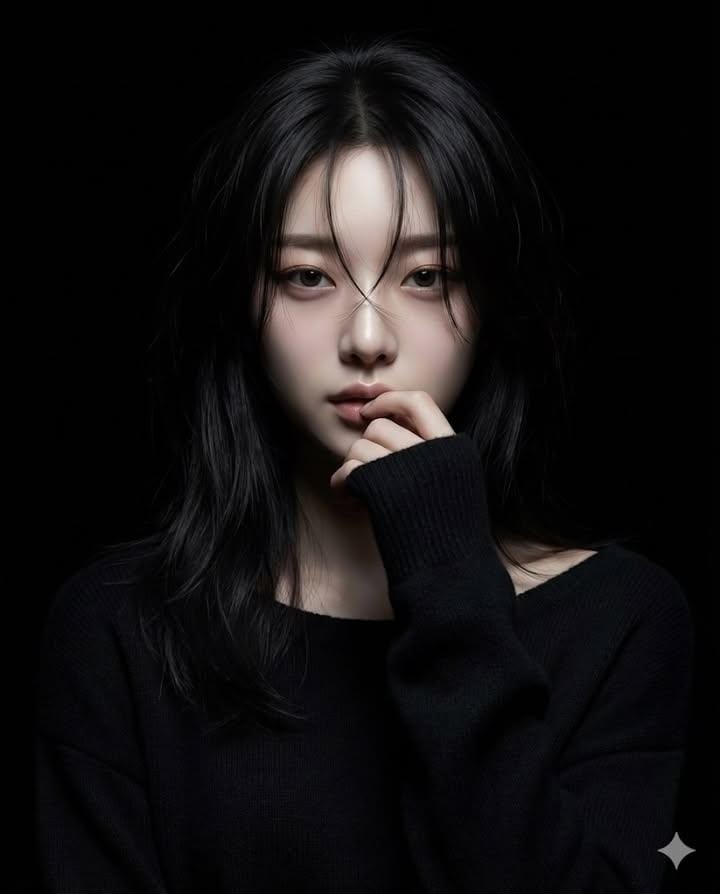
Prompt:
Generate a hyperrealistic realistic-anime portrait of a female character standing in a completely black background.
Lighting: use a **narrow beam spotlight** focused only on the center of the face.
The edges of the light must be sharp and dramatic.
All areas outside the spotlight should fall quickly into deep darkness
(high falloff shadow), almost blending into the black background.
Not soft lighting.
Hair: long dark hair with some strands falling over the face. The lower parts of the hair should fade into the shadows.
Pose: one hand raised gently to the lips in a shy, hesitant gesture.
Eyes looking directly at the camera with a mysterious mood.
Clothing: black long-sleeve knit sweater;
the sweater and body should mostly disappear into the darkness with minimal detail.
Overall tone: dark, moody, dramatic, mysterious.
High-contrast only in the lit portion of the face.
Everything outside the spotlight should be nearly invisible.
Source: Anissa (@SimplyAnnisa) - Post
Create a candid mirror selfie with specific styling and composition
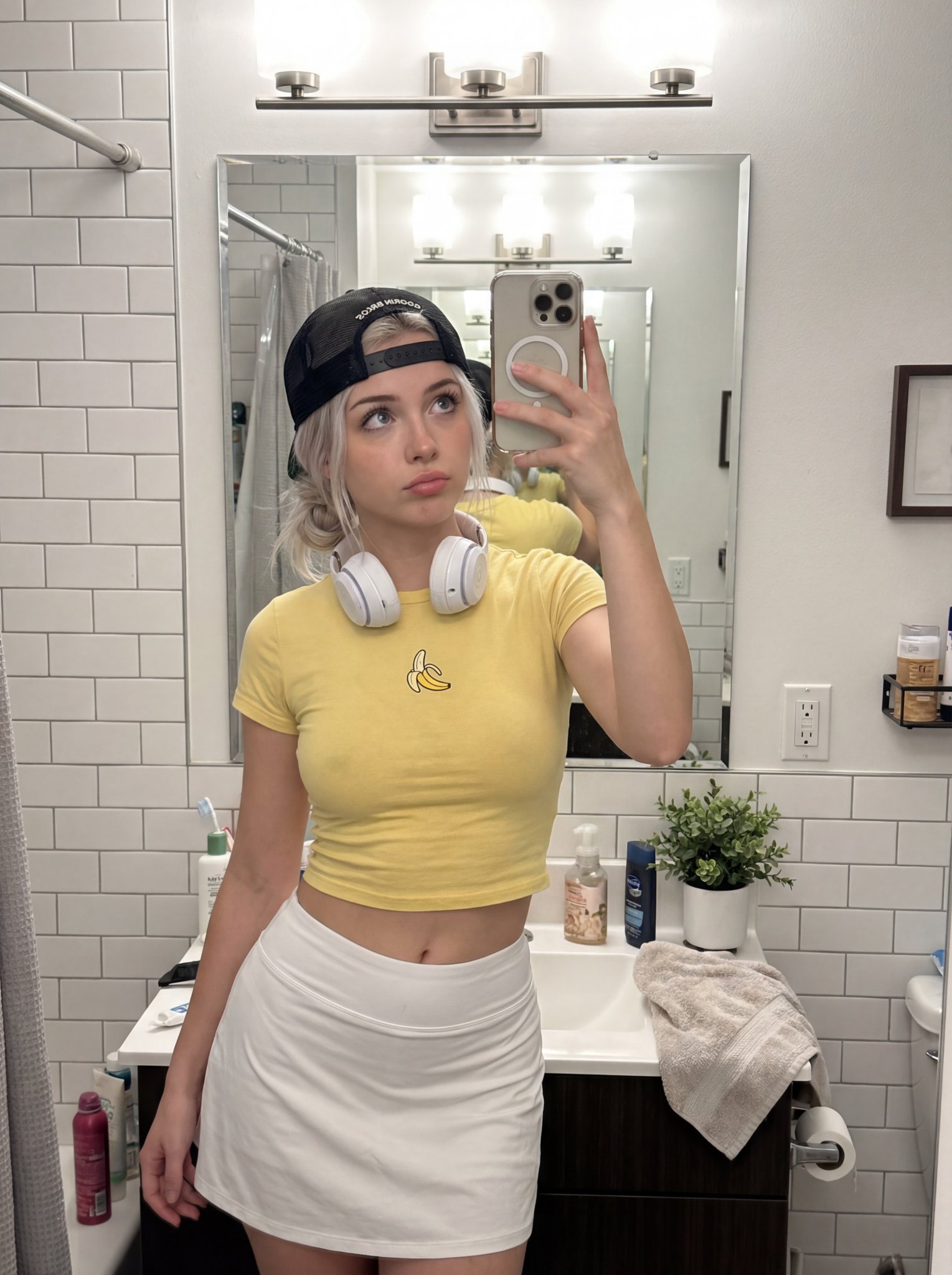
Prompt:
{
  "subject": {
    "description": "Young woman taking bathroom mirror selfie, innocent doe eyes but the outfit tells another story",
    "mirror_rules": "facing mirror, hips slightly angled, close to mirror filling frame",
    "age": "early 20s",

    "expression": {
      "eyes": "big innocent doe eyes looking up through lashes, 'who me?' energy",
      "mouth": "soft pout, lips slightly parted, maybe tiny tongue touching corner",
      "brows": "soft, slightly raised, faux innocent",
      "overall": "angel face but devil body, the contrast is the whole point"
    },

    "hair": {
      "color": "platinum blonde",
      "style": "messy bun or claw clip, loose strands framing face, effortless"
    },

    "body": {
      "waist": "tiny",
      "ass": "round, full, fabric of shorts riding up and clinging between cheeks, every curve visible through thin athletic material",
      "thighs": "thick, soft, shorts barely containing"
    },

    "clothing": {
      "top": {
        "type": "ULTRA mini crop tee",
        "color": "yellow",
        "graphic": "single BANANA logo/graphic",
        "fit": "barely containing chest, fabric stretched tight, ends just below, shows full stomach"
      },
      "bottom": {
        "type": "tight tennis skort or athletic booty shorts",
        "color": "white",
        "material": "thin stretchy athletic fabric",
        "fit": "vacuum tight, riding up, clinging between cheeks, fabric creases visible, leaving nothing to imagination"
      }
    },

    "face": {
      "features": "pretty - big eyes, small nose, full lips",
      "makeup": "minimal, natural, lip gloss, no-makeup makeup"
    }
  },

  "accessories": {
    "headwear": {
      "type": "Goorin Bros cap",
      "details": "black with animal patch, worn backwards or tilted"
    },
    "headphones": {
      "type": "over-ear white headphones",
      "position": "around neck"
    },
    "device": {
      "type": "iPhone",
      "details": "visible in mirror, held at chest level"
    }
  },

  "photography": {
    "camera_style": "casual iPhone mirror selfie, NOT professional",
    "quality": "iPhone camera - good but not studio, realistic social media quality",
    "angle": "eye-level, straight on mirror",
    "shot_type": "3/4 body, close to mirror",
    "aspect_ratio": "9:16 vertical",
    "texture": "natural, slightly grainy iPhone look, not over-processed"
  },

  "background": {
    "setting": "regular apartment bathroom",
    "style": "normal NYC apartment bathroom, not luxury",
    "elements": [
      "white subway tile walls",
      "basic bathroom mirror with good lighting above",
      "simple white sink vanity",
      "toiletries visible - skincare bottles, toothbrush holder",
      "towel hanging on hook",
      "maybe shower curtain edge visible",
      "small plant on counter"
    ],
    "atmosphere": "real bathroom, lived-in, normal home",
    "lighting": "good vanity lighting above mirror - bright, even, flattering but not studio"
  },

  "vibe": {
    "energy": "innocent face + sinful body = the whole game",
    "mood": "just got ready for tennis but making content first, 'what?' expression while wearing basically nothing",
    "contrast": "doe eyes + ass eating the shorts = lethal",
    "caption_energy": "'tennis anyone? 🍌' or 'running late oops'"
  }
}
Source: gauche (@gaucheai) - Post
Photorealistic documentation of a chalkboard anime drawing
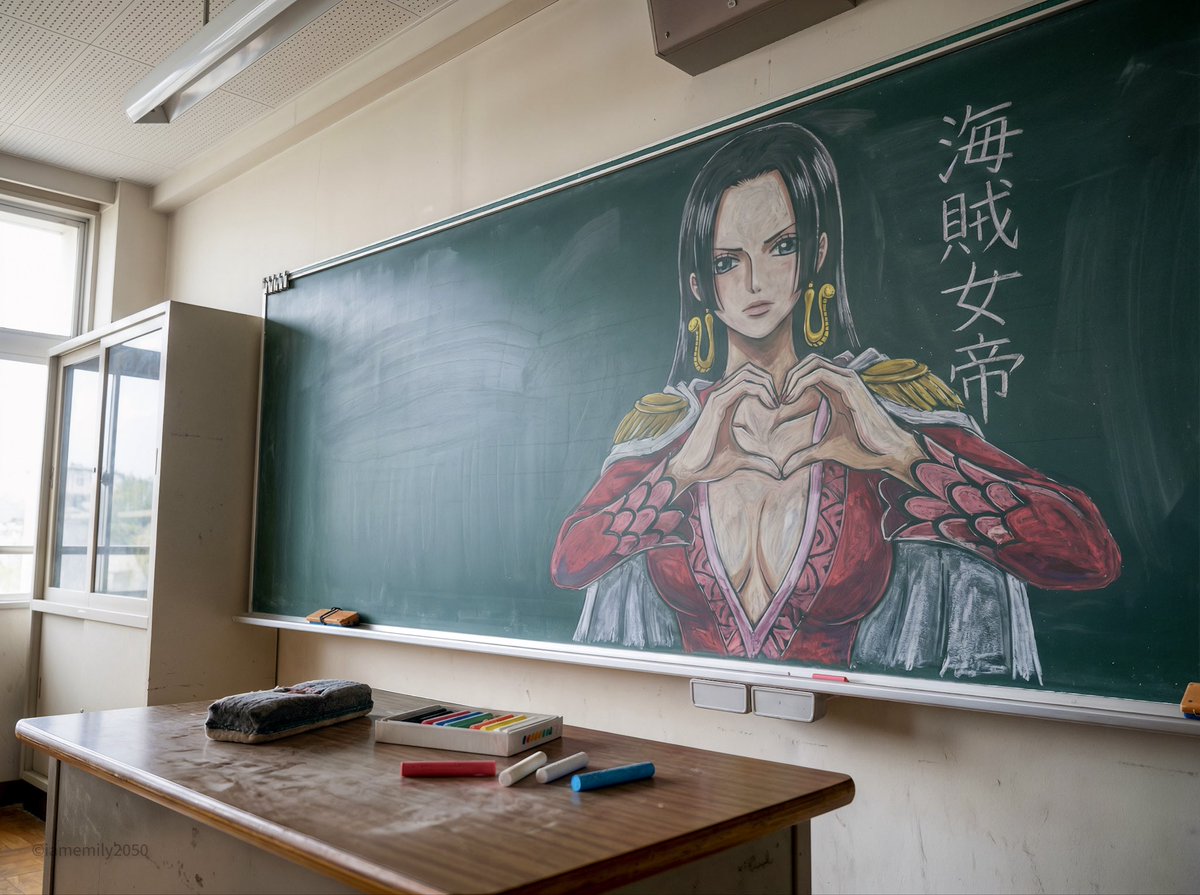
Prompt:
{
  "intent": "Photorealistic documentation of a specific chalkboard art piece featuring a single anime character, capturing the ephemeral nature of the medium within a classroom context.",
  "frame": {
    "aspect_ratio": "4:3",
    "composition": "A centered medium shot focusing on the chalkboard mural. The composition includes the teacher's desk in the immediate foreground to provide scale, with the artwork of the single character dominating the background space.",
    "style_mode": "documentary_realism, texture-focused, ambient naturalism"
  },
  "subject": {
    "primary_subject": "A large-scale, intricate chalk drawing of Boa Hancock from 'One Piece' on a standard green classroom blackboard.",
    "visual_details": "The illustration depicts Boa Hancock in a commanding pose, positioned centrally on the board. She is drawn with her signature long, straight black hair with a hime cut, rendered using dense application of black chalk with white accents for sheen. Her expression is haughty and imperious, with detailed dark blue eyes. She is depicted forming a heart shape with her hands, referencing her 'Mero Mero Mellow' technique. She wears a revealing red blouse with purple geometric patterns and gold snake-shaped earrings, drawn with vibrant colored chalks.",
    "medium_texture": "The image preserves the dusty, matte quality of the chalk. Visible hatching and cross-hatching strokes create shading on her clothing and hair. Smudged areas on the green slate indicate where colors have been blended by hand.",
    "surrounding_elements": "To the right of the character, vertical Japanese text reading '海賊女帝' (Pirate Empress) is written in crisp white chalk."
  },
  "environment": {
    "location": "A standard Japanese school classroom.",
    "foreground_elements": "A wooden teacher's desk occupies the lower foreground. Scattered across the surface are a yellow box of colored chalks, loose sticks of red, white, and blue pastel chalk, and a dust-covered black felt eraser.",
    "background_elements": "The green chalkboard spans the width of the frame, bordered by a metallic chalk tray containing accumulated chalk dust. The wall above is a plain, off-white plaster, featuring a small mounted speaker box.",
    "atmosphere": "Quiet and academic, with a sense of stillness suggesting the room is currently unoccupied."
  },
  "lighting": {
    "type": "Diffuse ambient classroom lighting.",
    "quality": "Soft, nondirectional illumination provided by overhead fluorescent fixtures mixed with daylight from windows on the left. The light is even, preventing glare on the chalkboard surface while highlighting the texture of the chalk.",
    "color_temperature": "Neutral white, approximately 5000K, ensuring accurate color rendition of the red and purple chalks against the dark green board.",
    "direction": "Overhead and slightly frontal."
  },
  "camera": {
    "sensor_format": "35mm full-frame digital sensor.",
    "lens": "35mm prime lens.",
    "aperture": "f/5.6",
    "depth_of_field": "Moderate depth of field, keeping the chalkboard drawing in sharp focus while allowing the foreground desk elements to soften slightly.",
    "shutter_speed": "1/60s",
    "iso": "400",
    "camera_position": "Eye-level standing position, set back enough to frame the entire drawing and the desk."
  },
  "negative": {
    "content": "Multiple characters, Midoriya, Shigaraki, male characters, digital art overlay, vector graphics, paper texture, oil painting, messy composition, extreme low angle, fisheye lens.",
    "style": "No hyper-saturation, no soft focus filters, no heavy vignetting."
  }
}
Source: Emily (@IamEmily2050) - Post
Create a winter portrait with a puppy
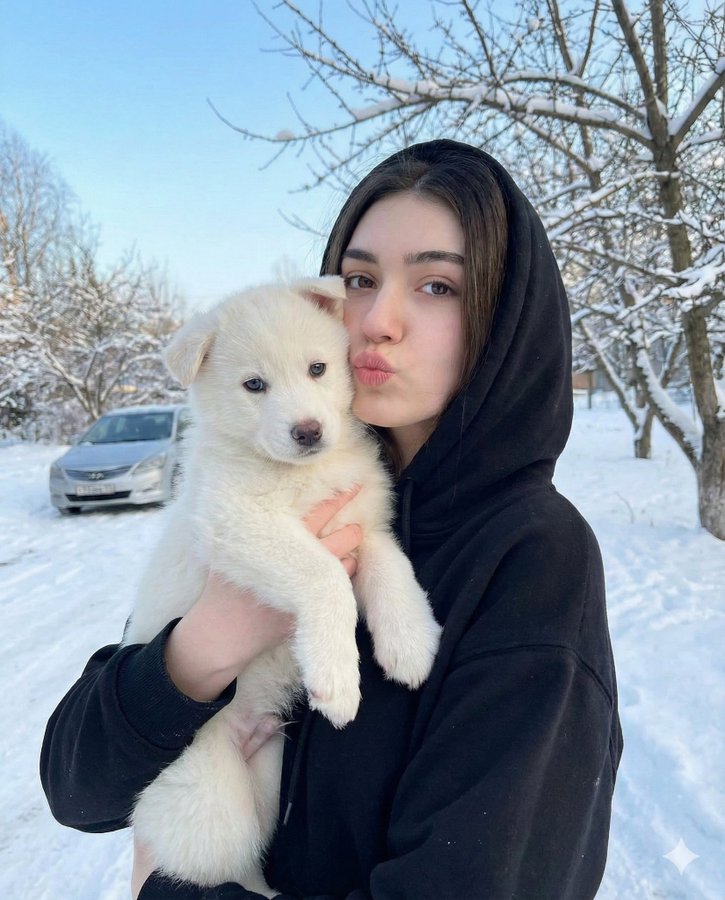
Prompt:
{
  "image_description": {
    "subject": {
      "face": {
        "preserve_original": true,
        "reference_match": true,
        "description": "The girl's facial features, expression, and identity must remain exactly the same as the reference image."
      },
      "girl": {
        "age": "young",
        "hair": "long, wavy brown hair",
        "expression": "puckering her lips toward the camera",
        "clothing": "black hooded sweatshirt"
      },
      "puppy": {
        "type": "small white puppy",
        "eyes": "light blue",
        "expression": "calm, looking forward"
      }
    },
    "environment": {
      "setting": "outdoors in a winter scene",
      "elements": [
        "snow covering the ground",
        "bare trees in the background",
        "blurred silver car behind the girl"
      ],
      "sky": "clear light blue sky"
    },
    "mood": "cute, natural, winter outdoor moment",
    "camera_style": "soft depth of field, natural daylight, subtle winter tones"
  }
}
Source: Zara (@ZaraIrahh) - Post
A 360-degree selfie with movie characters
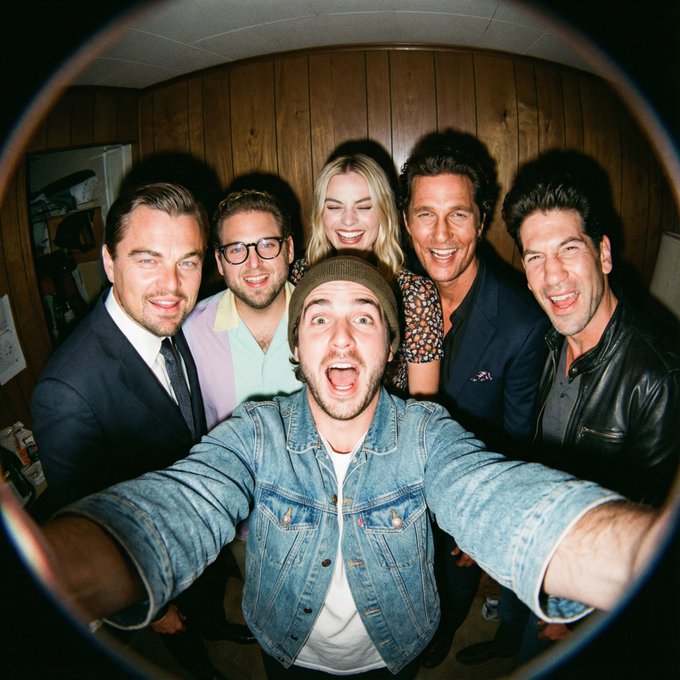
Prompt:
A film-like fisheye wide-angle 360-degree selfie without any camera or phone visible in the subject's hands. A real and exaggerated selfie of [person from uploaded image] with [CHARACTERS]. They are making faces at the camera.

(more detailed version)
A hyper-realistic fisheye wide-angle selfie, captured with a vintage 35mm fisheye lens creating heavy barrel distortion. without any camera or phone visible in the subject's hands.
Subject & Action: A close-up, distorted group photo featuring [Person From Uploaded Image] taking selfie with [CHARACTERS]. Everyone is making wild, exaggerated faces, squinting slightly from the flash.
Lighting & Texture: Harsh, direct on-camera flash lighting that creates hard shadows behind the subjects. Authentic film grain, slight motion blur on the edges, and chromatic aberration. It looks like a candid, amateur snapshot as if captured during a chaotic behind-the-scenes moment, not a studio photo.
Source: ΛRMIN | AI (@Arminn_Ai) - Post
Take a selfie with a movie character while preserving your features
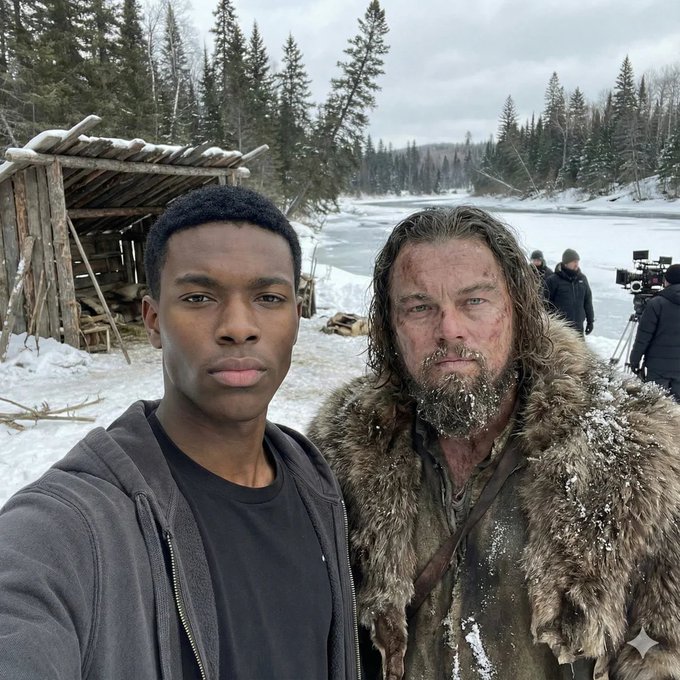
Prompt:
"I'm taking a selfie with [movie character] on the set of [movie name].

Keep the person exactly as shown in the reference image with 100% identical facial features, bone structure, skin tone, facial expression, pose, and appearance. 1:1 aspect ratio, 4K detail."
Source: Rohan Paul (@rohanpaul_ai) - Post
A commercial-grade photo with a classical oil painting
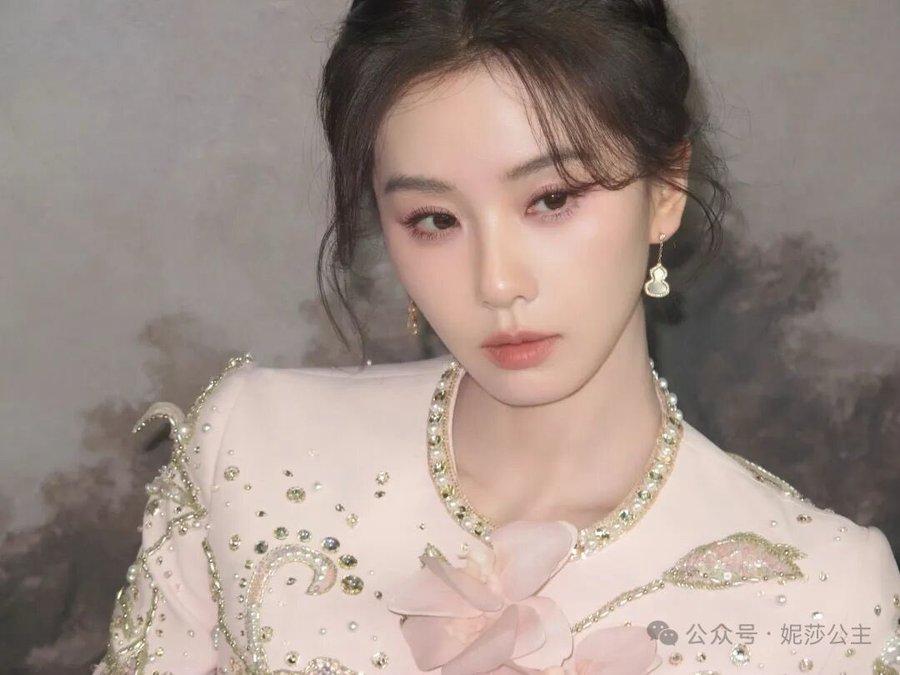

Prompt:
A commercial grade photograph of [uploaed reference image] posing inside a high-end museum exhibition space.
[the character Source: Based strictly on the uploaded reference image.
Behind them hangs a large, ornate framed classical oil painting.

The painting depicts the same person but rendered in a rich,
traditional oil painting style with thick, visible impasto brushstrokes, deep textures, and rich color palettes on canvas.
Gallery spotlights hit the textured paint surface.
Masterpiece, ultra-detailed, cinematic lighting, strong contrast, dramatic shadows, 8K UHD, highly detailed textures
, professional photography.
Source: 烟花老师(一支烟花) (@brad_zhang2024) - Post
A photo displayed on a compact digital camera screen
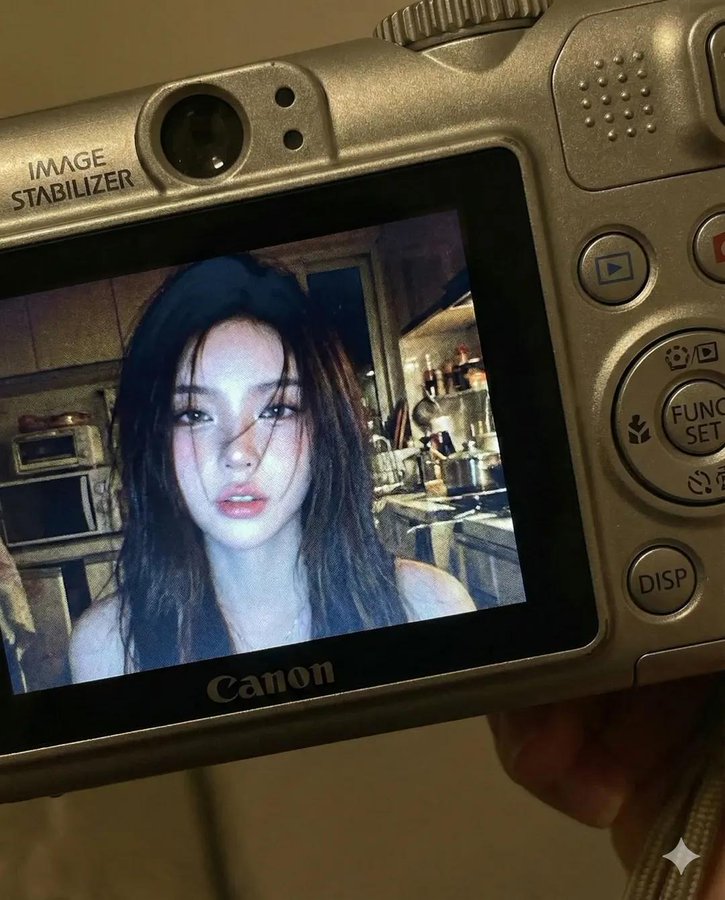
Prompt:
Use facial feature of attached photo. A close-up shot of a young woman displayed on the screen of a compact Canon digital camera. The camera body surrounds the image with its buttons, dials, and textured surface visible, including the FUNC/SET wheel, DISP button, and the "IMAGE STABILIZER" label along the side. The photo on the screen shows the woman indoors at night, illuminated by a bright built-in flash that creates sharp highlights on her face and hair. She has long dark hair falling across part of her face in loose strands, with a soft, slightly open-lip expression. The flash accentuates her features against a dim, cluttered kitchen background with appliances, shelves, and metallic surfaces softly blurred. The mood is candid, raw, nostalgic, and reminiscent of early 2000s digital camera snapshots. Colors are slightly muted with cool undertones, strong flash contrast, and natural grain from the display. No text, no logos inside the photo preview itself.

Scale ratio: 4:5 vertical

Camera: compact digital camera simulation
Lens: equivalent to 28–35mm
Aperture: f/2.8
ISO: 400
Shutter speed: 1/60 with flash
White balance: auto flash
Lighting: harsh direct flash on subject, ambient low light in the background
Color grading: nostalgic digital-camera tones, high contrast flash, subtle display grain, authentic screen glow.
Source: simply (@kingofdairyque) - Post
Create a glossy magazine cover
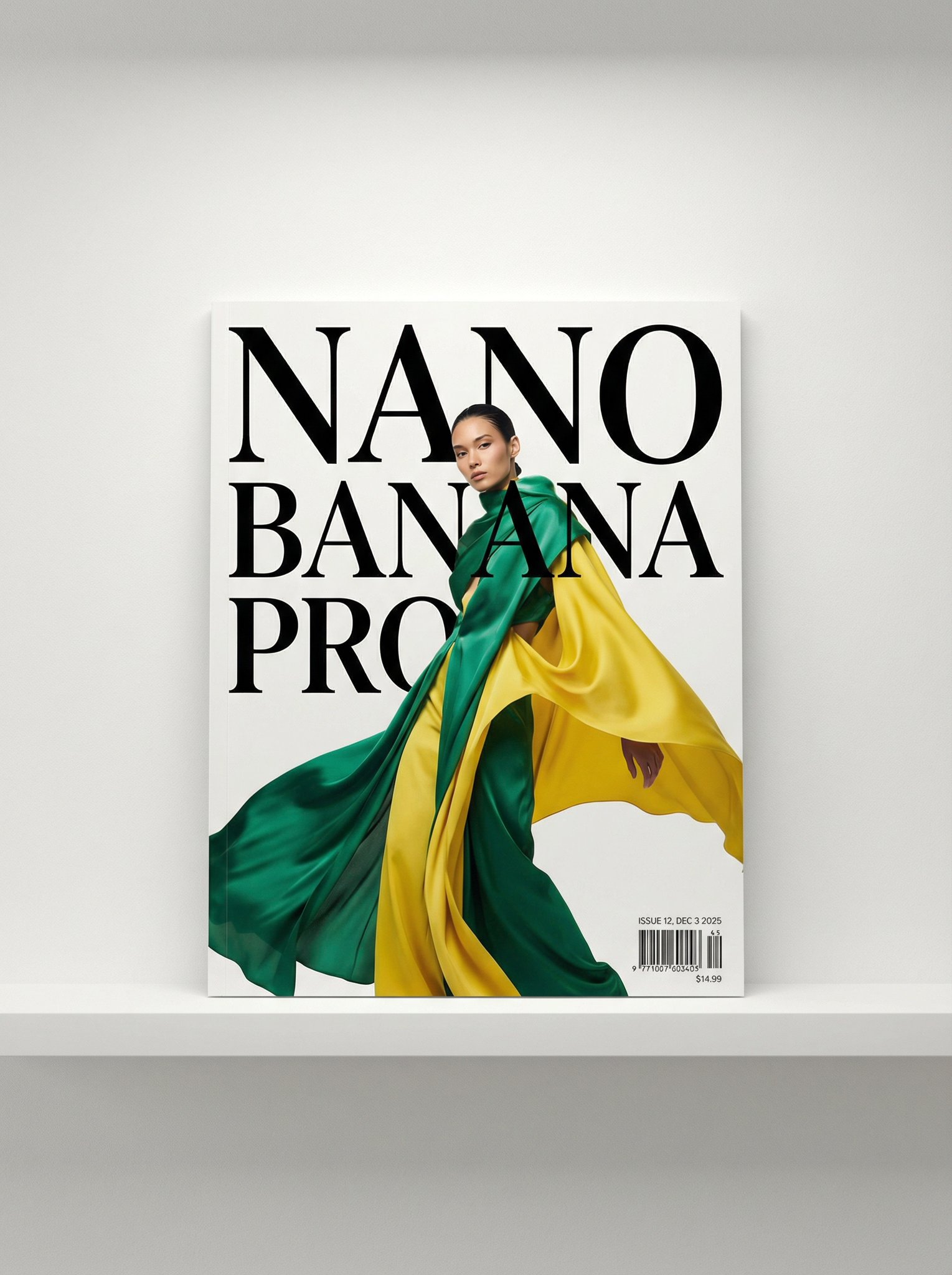
Prompt:
A photo of a glossy magazine cover, the cover has the large bold words "Nano Banana Pro". The text is in a serif font, black on white, and fills the view. No other text.

In front of the text there is a dynamic portrait of a person in green and banana yellow colored high-end fashion.

Put the issue number and today's date in the corner along with a barcode and a price. The magazine is on a white shelf against a wall.
Source: Nano Banana Pro (@NanoBanana) - Post
Create a floating luxury product shot

Prompt:
Product:
[BRAND] [PRODUCT NAME] - [bottle shape], [label description], [liquid color]

Scene:
Luxury product shot floating on dark water with [flower type] in [colors] arranged around it.
[Lighting style - e.g., "golden hour glow" /
"bright fresh light"] creates reflections and ripples across the water.

Mood & Style:
[Adjectives - e.g., "ethereal and luxurious" /
"fresh and clean"], high-end commercial photography, [camera angle], shallow depth of field with soft bokeh background
Source: AmirMušić (@AmirMushich) - Post
Prompts focused on pushing the boundaries of composition, crowd generation, minimalism, and temporal consistency.
A complex prompt testing the model's ability to handle dense crowds and specific character recognition.

Prompt:
A where is waldo image showing all Star Wars characters on Tatooine

First one to pull this off. First take. Even Waldo is there.
Source: @creacas
Demonstrates temporal consistency and aging effects on a single subject.

Prompt:
"Generate the holiday photo of this person through the ages up to 80 years old"
Source: @dr_cintas
Demonstrates the model's ability to handle infinite loop logic (Droste effect).

Prompt:
recursive image of an orange cat sitting in an office chair holding up an iPad. On the iPad is the same cat in the same scene holding up the same iPad. Repeated on each iPad.
Source: @venturetwins
Generates a specific location and time based purely on latitude/longitude coordinates.

Prompt:
35.6586° N, 139.7454° E at 19:00
Source: Replicate
Interpretative rendering of how a specific group (engineers) visualizes a landmark.

Prompt:
How engineers see the San Francisco Bridge
Source: Replicate
Interprets a filename as a visual subject.
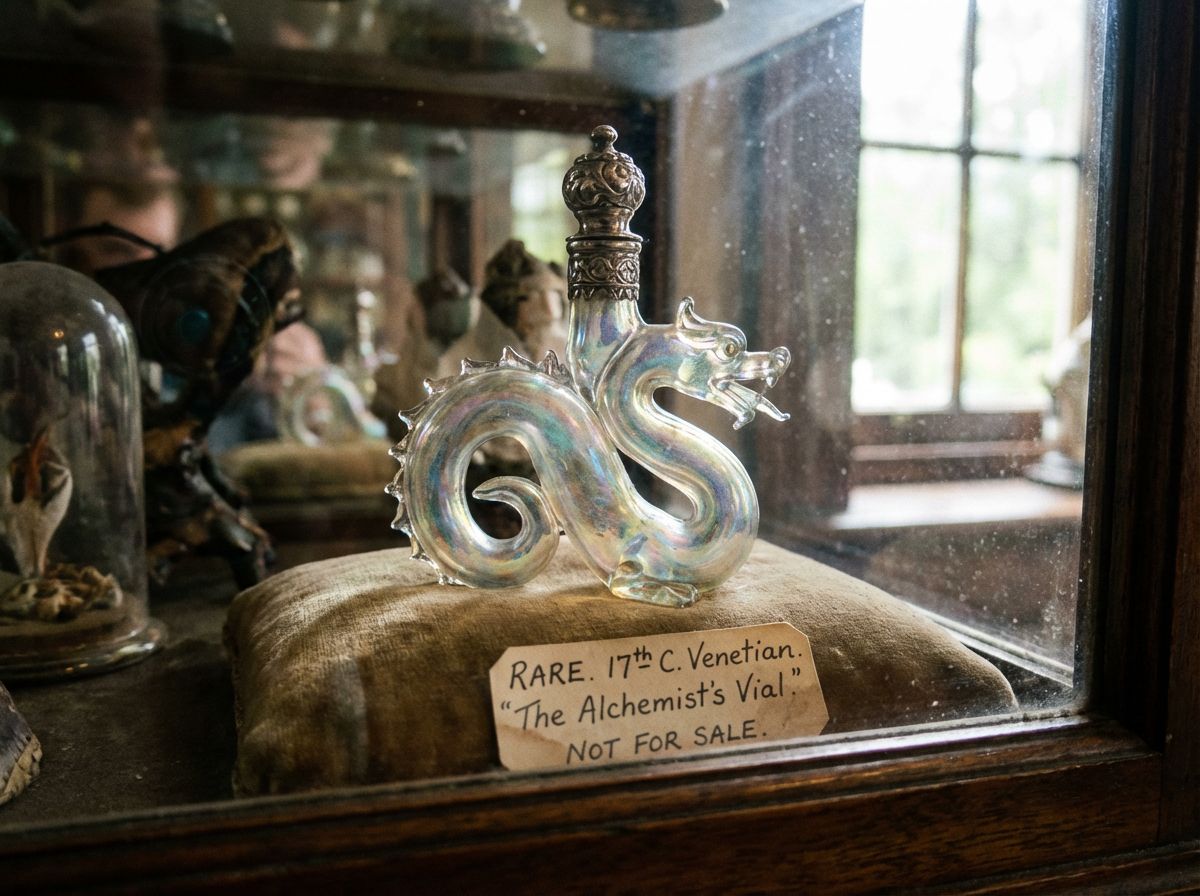
Prompt:
rare.jpg
Source: Replicate
Combines multiple input portraits into a single cohesive group photo with a specific expression.
| Input References | Generated Output |
|---|---|
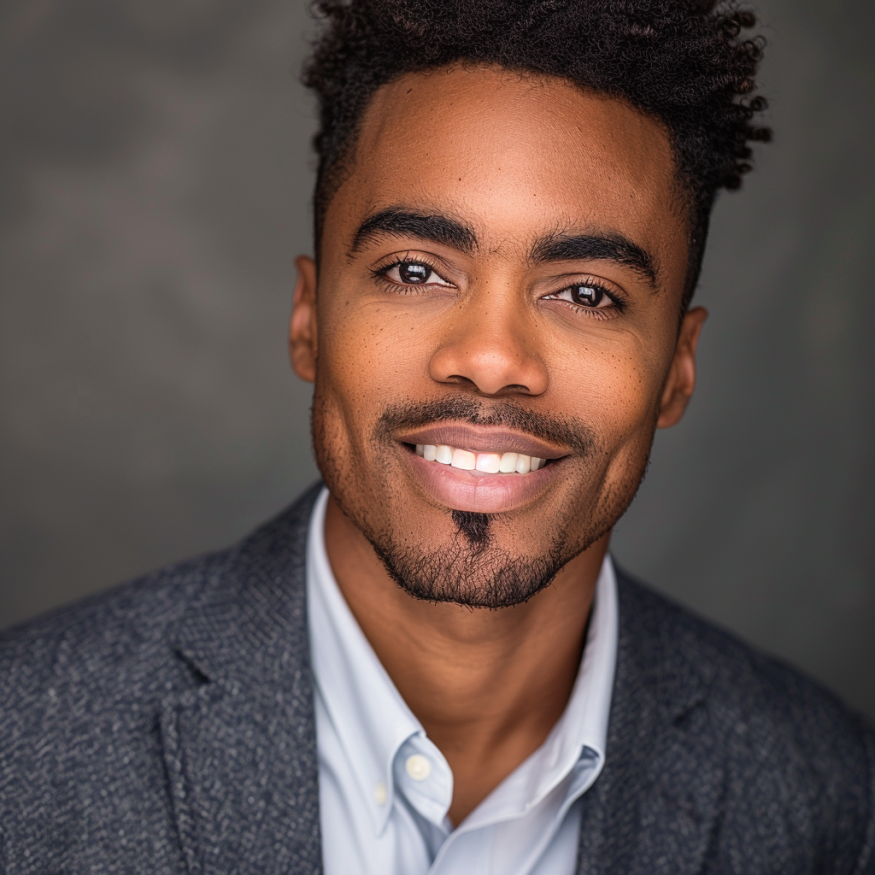 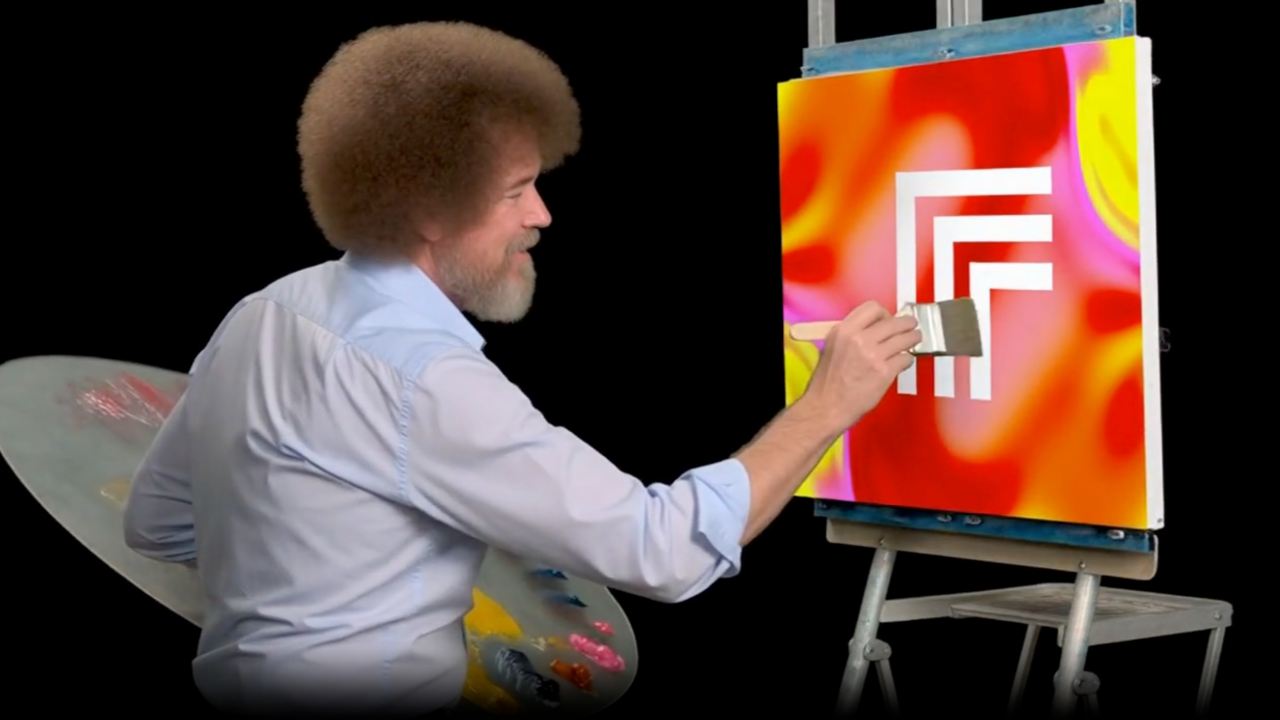 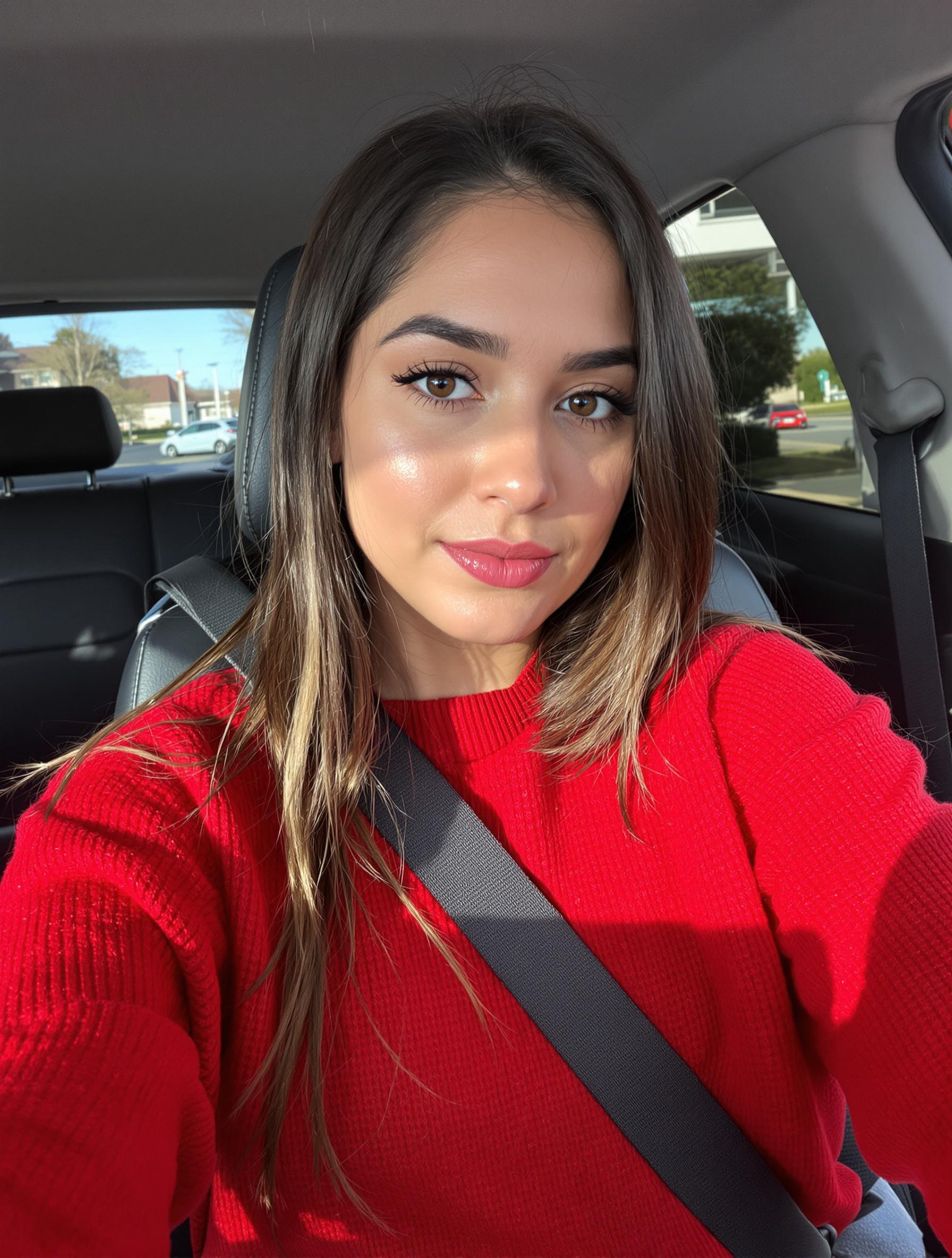 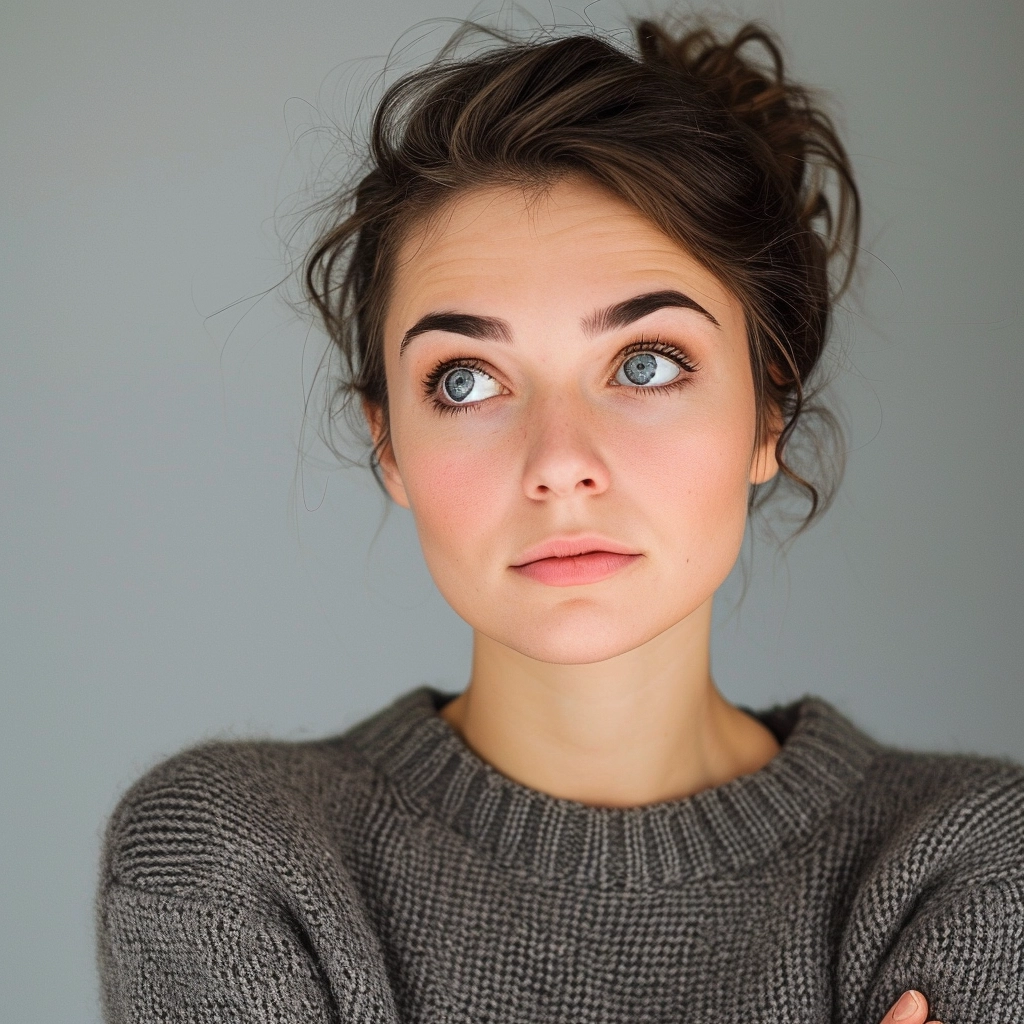 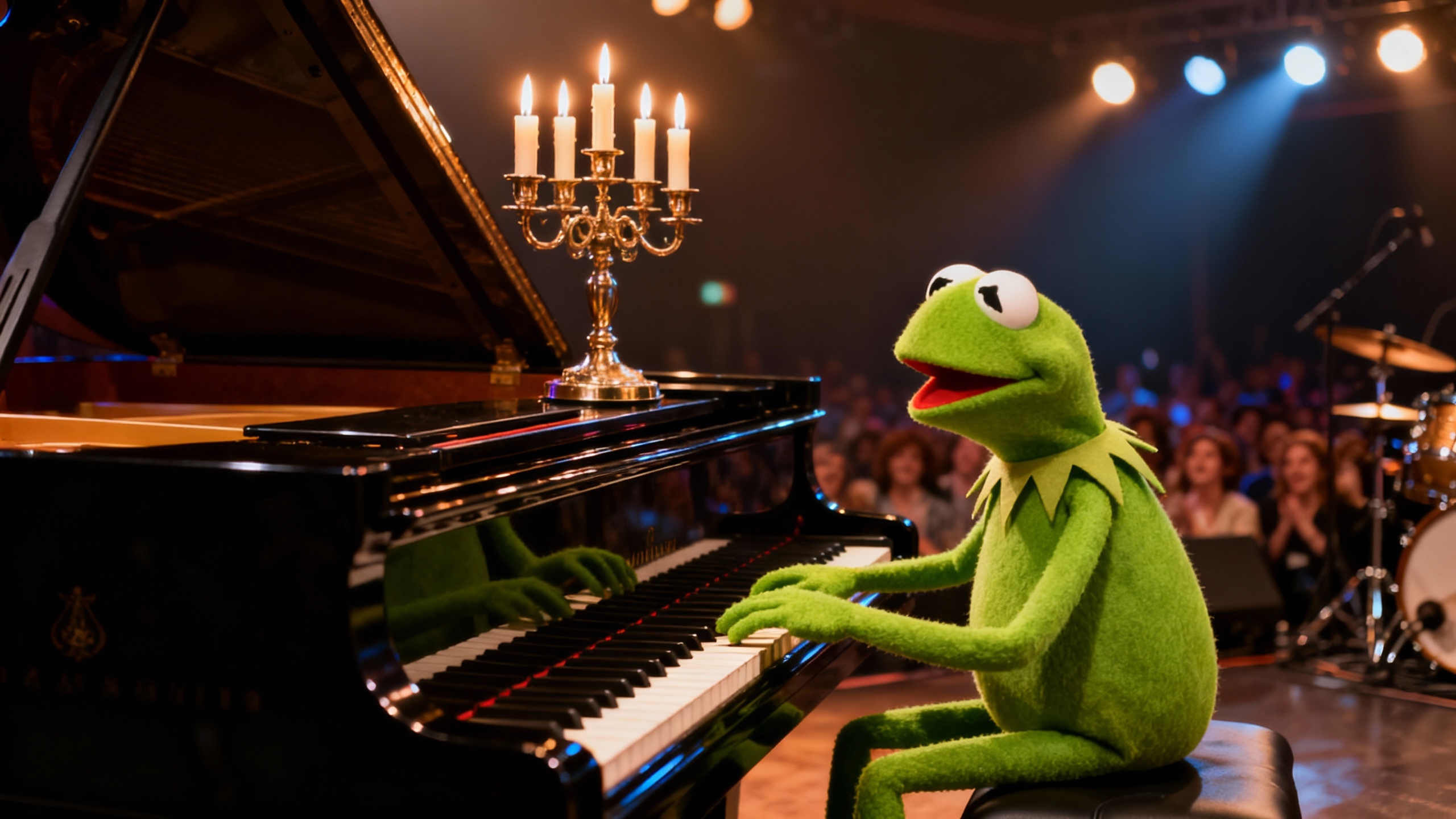 |
 |
Prompt:
an office team photo, everyone making a silly face
Source: Replicate
Simulating specific drawing media (faded marker) on glass textures.

Prompt:
Create a photo of vagabonds musashi praying drawn on a glass whiteboard in a slightly faded green marker
Source: @nicdunz
Create a 3D render with realistic left half and wireframe right half
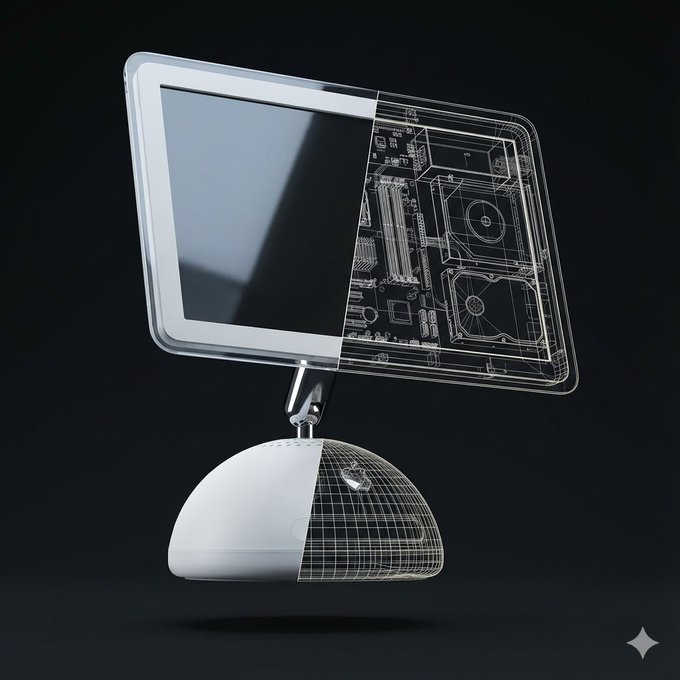
Prompt:
Create a high-quality, realistic 3D render of exactly one instance of the object: [Orange iPhone 17 Pro].
The object must float freely in mid-air and be gently tilted and rotated in 3D space (not front-facing).
Use a soft, minimalist dark background in a clean 1080×1080 composition.
Left Half — Full Realism
The left half of the object should appear exactly as it looks in real life
— accurate materials, colors, textures, reflections, and proportions.
This half must be completely opaque with no transparency and no wireframe overlay.
No soft transition, no fading, no blending.
Right Half — Hard Cut Wireframe Interior
The right half must switch cleanly to a wireframe interior diagram.
The boundary between the two halves must be a perfectly vertical, perfectly sharp, crisp cut line, stretching straight from the top edge to the bottom edge of the object.
No diagonal edges, no curved slicing, no gradient.
The wireframe must use only two line colors:
Primary: white (≈80% of all lines)
Secondary: a color sampled from the dominant color of the realistic half (<20% of lines)
The wireframe lines must be thin, precise, aligned, and engineering-style.
Every wireframe component must perfectly match the geometry of the object.
Strict Single-Object Rule
Render only ONE object in the entire frame.  Render only one physical object.
Do NOT show a second object from any angle. Do NOT show a second object as a reflection, shadow, silhouette, outline, ghost image, or transparency. Do NOT show a second object for comparison or display purposes. Do NOT show both the front and the back separately.
Do NOT show an extra device behind, beside, underneath, or partially hidden.
Only one single object is allowed in the entire frame.
No duplicate objects, no mirrored back-and-front pairings, no reflections showing a second object.
The object must appear alone, floating.
Pose & Lighting:
Apply a natural, subtle tilt + rotation in 3D to make it look like a floating product visualization.
Use soft, neutral global illumination and no shadows under the object.
No extra props, no text, no labels unless explicitly requested.
Source: Michal Malewicz (@michalmalewicz) - Post
Create an isometric 3D diorama of US landmarks
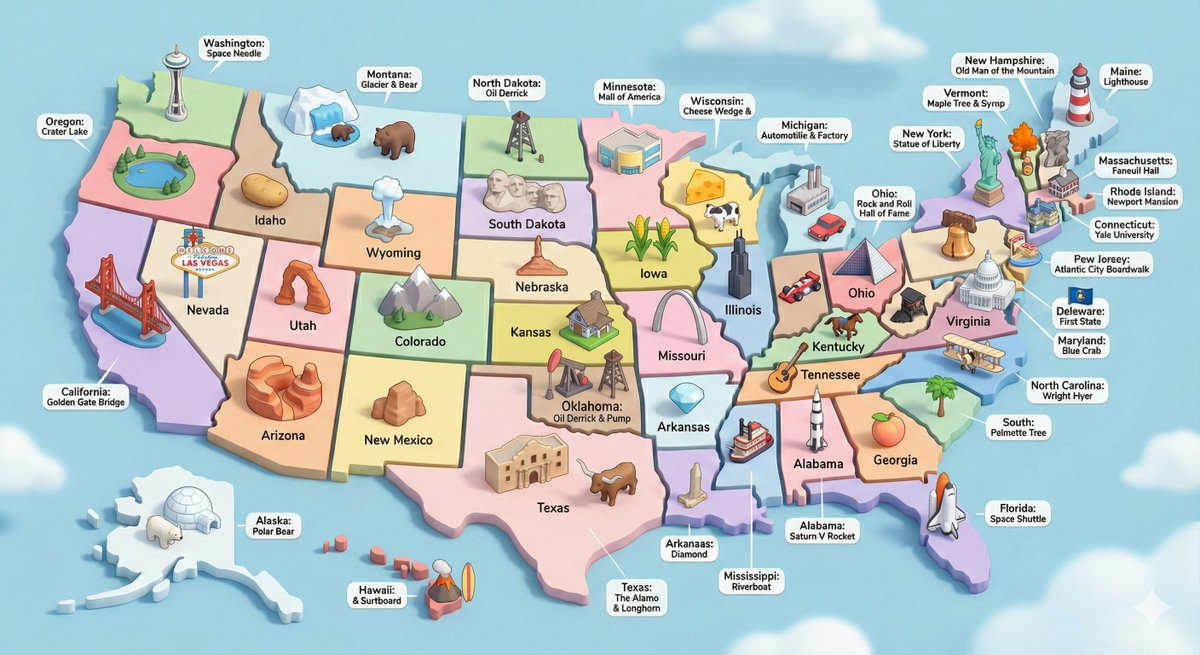
Prompt:
Create a high-detail 3D isometric diorama of the entire United States, where each state is represented as its own miniature platform. Inside each state, place a stylized, small-scale 3D model of that state's most iconic landmark. Use the same visual style as a cute, polished 3D city diorama: soft pastel colors, clean materials, smooth rounded forms, gentle shadows, and subtle reflections. Each landmark should look like a miniature model, charming, simplified, but clearly recognizable. Arrange the states in accurate geographical layout, with consistent lighting and perspective. Include state labels and landmark labels in a clean, modern font, floating above or near each model.
Source: Data Exec (@DataExec) - Post
Create a map of US states made of famous foods
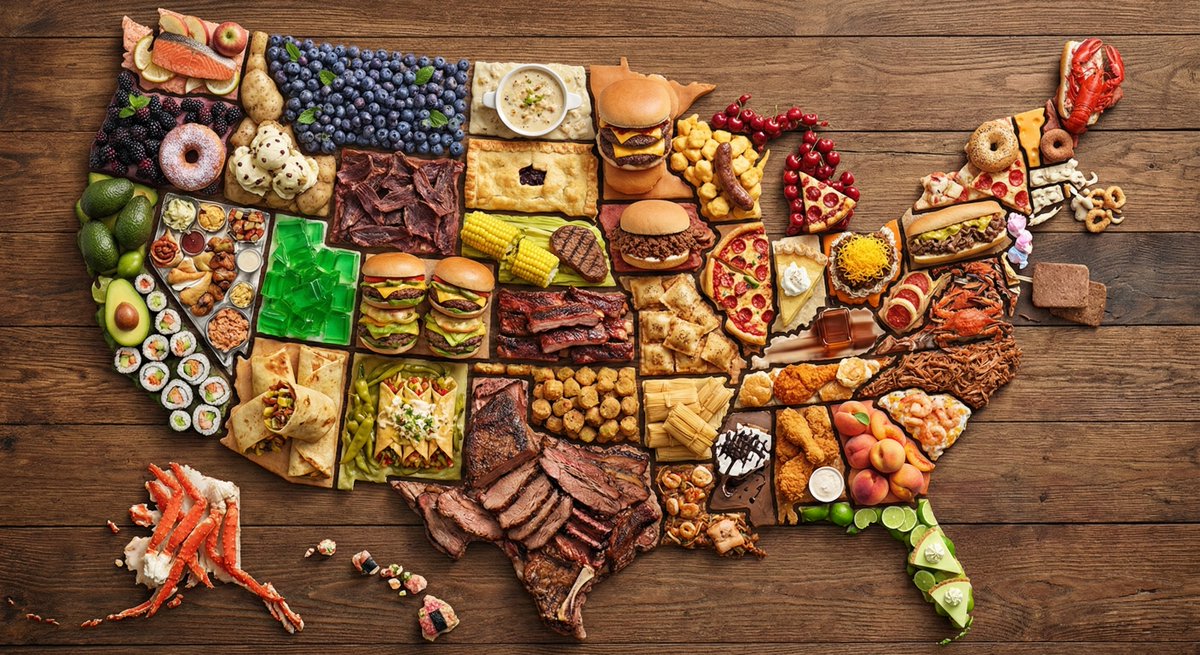
Prompt:
create a map of the US where every state is made out of its most famous food (the states should actually look like they are made of the food, not a picture of the food). Check carefully to make sure each state is right.
Source: Ethan Mollick (@emollick) - Post
Create a miniature 3D view of city's tallest buildings
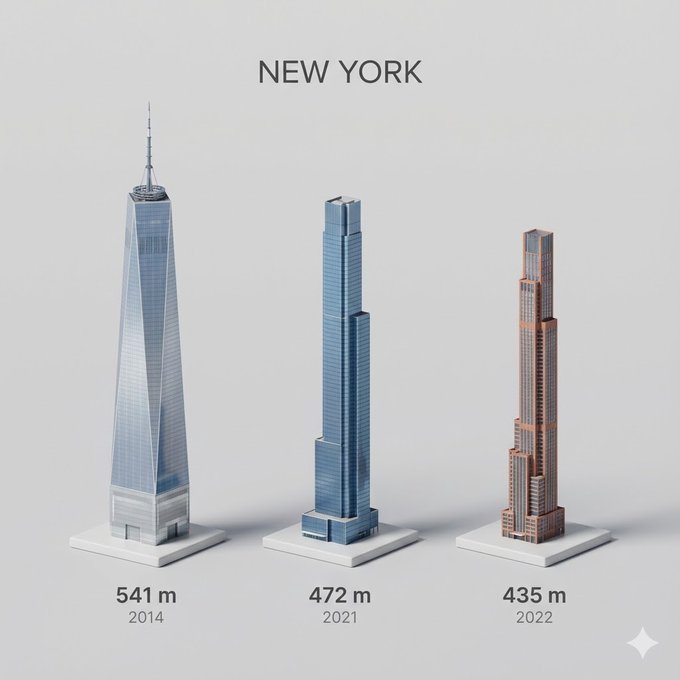
Prompt:
Present a clear, side miniature 3D cartoon view of [YOUR CITY] tallest buildings. Use minimal textures with realistic materials and soft, lifelike lighting and shadows. Use a clean, minimalistic composition showing exactly the three tallest buildings in Sopot, arranged from LEFT to RIGHT in STRICT descending height order. The tallest must appear visibly tallest, the second must be clearly shorter than the first, and the third must be clearly shorter than the second.
All buildings must follow accurate relative proportions: if a building is taller in real life, it MUST be taller in the image by the same approximate ratio. No building may be visually stretched or compressed.
Each building should stand separately on a thin, simple ceramic base. Below each base, centered text should display:
Height in meters — semibold sans-serif, medium size
Year built — lighter-weight sans-serif, smaller size, directly beneath the height text
Provide consistent padding, spacing, leading, and kerning. Write "YOUR CITY NAME" centered above the buildings, using a medium-sized sans-serif font.
 No building top should overlap or touch the text above.Use accurate architectural proportions based on real-world references.Maintain consistent camera angle and identical scale for each building model.
No forced perspective. Use straight-on orthographic-style rendering. Do not exaggerate or stylize size differences beyond proportional accuracy.

Use a square 1080×1080 composition.Use a clean, neutral background. Ensure no extra objects are present.
Source: Michal Malewicz (@michalmalewicz) - Post
Create a 3D isometric view of a home office
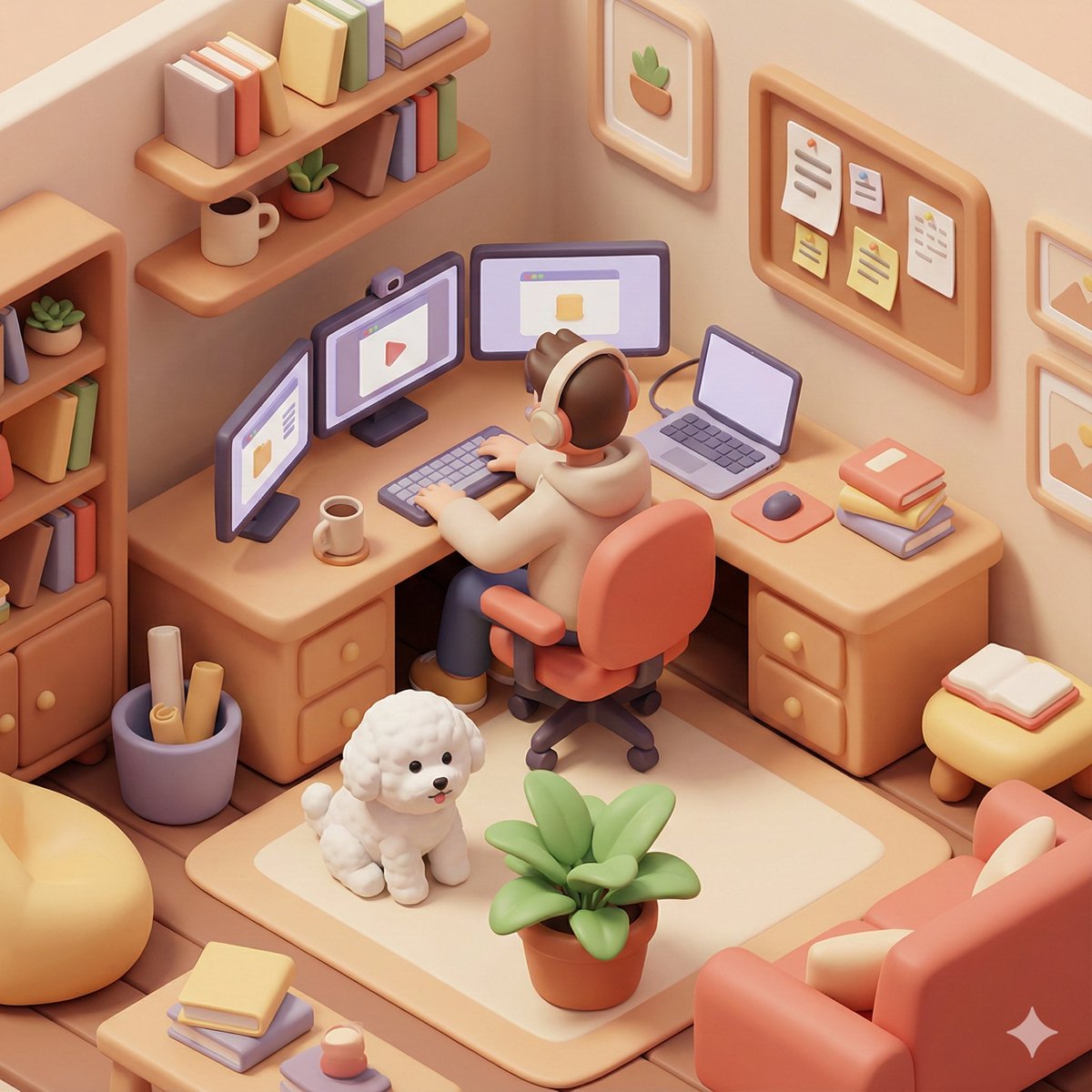
Prompt:
Based on you know about me, generate a 3D isometric colored illustration of me working from home, filled with various interior details. The visual style should be rounded, polished, and playful. --ar 1:1

[Additional details: a bichon frise and 3 monitors]
Combine emojis in a Google-style design
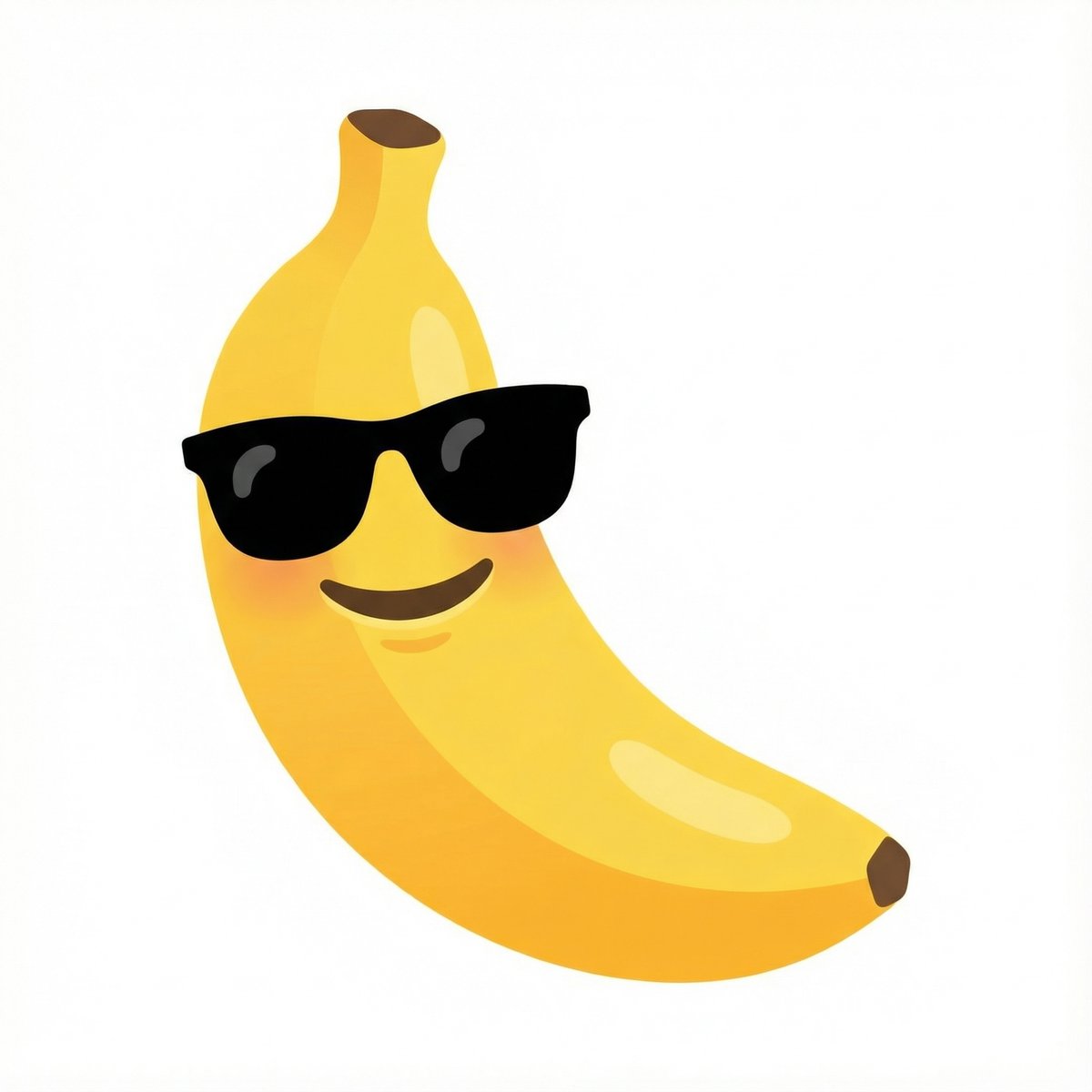
Prompt:
combine these emojis: 🍌 + 😎, on a white background as a google emoji design
Source: Nano Banana Pro (@NanoBanana) - Post
Add torn paper effect to specific areas of an image
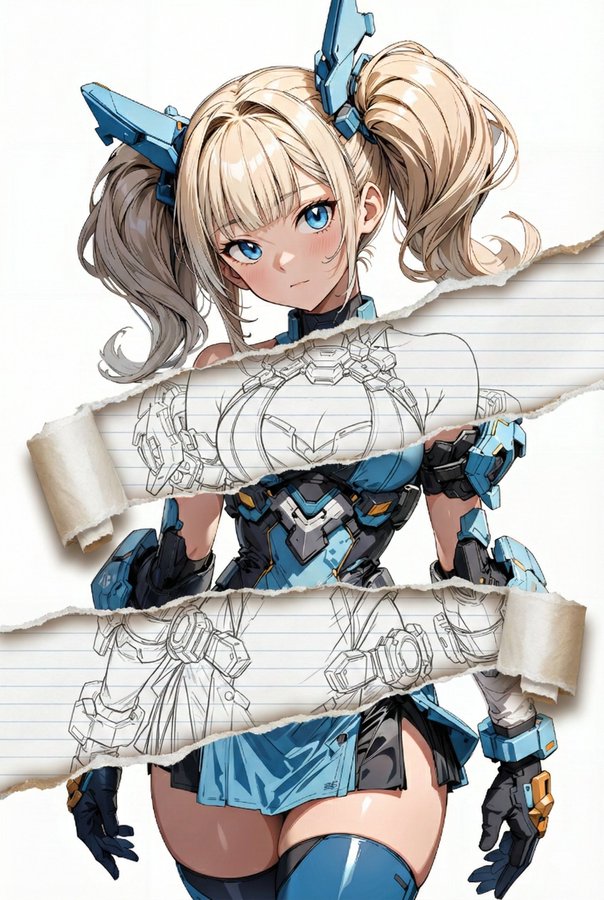
Prompt:
task: "edit-image: add widened torn-paper layered effect"

base_image:
  use_reference_image: true
  preserve_everything:
    - character identity
    - facial features and expression
    - hairstyle and anatomy
    - outfit design and colors
    - background, lighting, composition
    - overall art style

rules:
  - Only modify the torn-paper interior areas.
  - Do not change pose, anatomy, proportions, clothing details, shading, or scene elements.

effects:
  - effect: "torn-paper-reveal"
    placement: "across chest height"
    description:
      - Add a wide, natural horizontal tear across the chest area.
      - The torn interior uses the style defined in `interior_style`.

  - effect: "torn-paper-reveal"
    placement: "lower abdomen height"
    description:
      - Add a wide horizontal tear across the lower abdomen.
      - The torn interior uses the style defined in `interior_style`.

interior_style:
  mode: "line-art"

  style_settings:
    line-art:
      palette: "monochrome"
      line_quality: "clean, crisp"
      paper: "notebook paper with subtle ruled lines"

    sumi-e:
      palette: "black ink tones"
      brush_texture: "soft bleeding edges"
      paper: "plain textured paper"

    figure-render:
      material: "PVC-like"
      shading: "semi-realistic highlights"
      paper: "plain smooth surface"

    colored-pencil:
      stroke_texture: "visible pencil grain"
      palette: "soft layered hues"
      paper: "rough sketchbook paper"

    watercolor:
      palette: "soft transparent pigments"
      blending: "smooth bleeding"
      edges: "soft contours"
      paper: "watercolor paper texture"

    pencil-drawing:
      graphite_texture: "visible pencil grain"
      shading: "smooth gradients"
      line_quality: "mixed sharp and soft"
      tone: "gray-scale"
      paper: "notebook paper with faint ruled lines"
Source: てんねん (@munou_ac) - Post
Generates cinematic keyframes and storyboards from a reference image
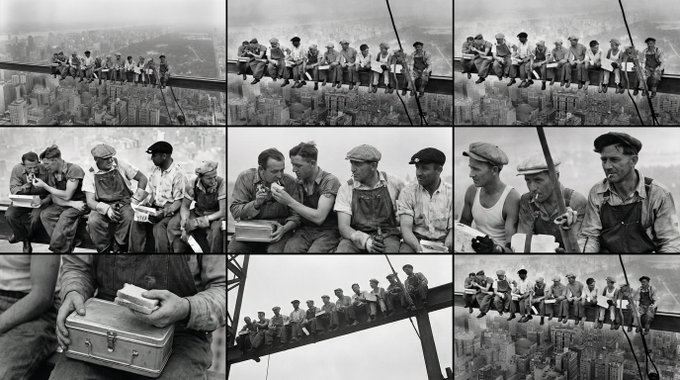
Prompt:
<role>
You are an award-winning trailer director + cinematographer + storyboard artist. Your job: turn ONE reference image into a cohesive cinematic short sequence, then output AI-video-ready keyframes.
</role>

<input>
User provides: one reference image (image).
</input>

<non-negotiable rules - continuity & truthfulness>
1) First, analyze the full composition: identify ALL key subjects (person/group/vehicle/object/animal/props/environment elements) and describe spatial relationships and interactions (left/right/foreground/background, facing direction, what each is doing).
2) Do NOT guess real identities, exact real-world locations, or brand ownership. Stick to visible facts. Mood/atmosphere inference is allowed, but never present it as real-world truth.
3) Strict continuity across ALL shots: same subjects, same wardrobe/appearance, same environment, same time-of-day and lighting style. Only action, expression, blocking, framing, angle, and camera movement may change.
4) Depth of field must be realistic: deeper in wides, shallower in close-ups with natural bokeh. Keep ONE consistent cinematic color grade across the entire sequence.
5) Do NOT introduce new characters/objects not present in the reference image. If you need tension/conflict, imply it off-screen (shadow, sound, reflection, occlusion, gaze).
</non-negotiable rules - continuity & truthfulness>

<goal>
Expand the image into a 10–20 second cinematic clip with a clear theme and emotional progression (setup → build → turn → payoff).
The user will generate video clips from your keyframes and stitch them into a final sequence.
</goal>

<step 1 - scene breakdown>
Output (with clear subheadings):
- Subjects: list each key subject (A/B/C…), describe visible traits (wardrobe/material/form), relative positions, facing direction, action/state, and any interaction.
- Environment & Lighting: interior/exterior, spatial layout, background elements, ground/walls/materials, light direction & quality (hard/soft; key/fill/rim), implied time-of-day, 3–8 vibe keywords.
- Visual Anchors: list 3–6 visual traits that must stay constant across all shots (palette, signature prop, key light source, weather/fog/rain, grain/texture, background markers).
</step 1 - scene breakdown>

<step 2 - theme & story>
From the image, propose:
- Theme: one sentence.
- Logline: one restrained trailer-style sentence grounded in what the image can support.
- Emotional Arc: 4 beats (setup/build/turn/payoff), one line each.
</step 2 - theme & story>

<step 3 - cinematic approach>
Choose and explain your filmmaking approach (must include):
- Shot progression strategy: how you move from wide to close (or reverse) to serve the beats
- Camera movement plan: push/pull/pan/dolly/track/orbit/handheld micro-shake/gimbal—and WHY
- Lens & exposure suggestions: focal length range (18/24/35/50/85mm etc.), DoF tendency (shallow/medium/deep), shutter "feel" (cinematic vs documentary)
- Light & color: contrast, key tones, material rendering priorities, optional grain (must match the reference style)
</step 3 - cinematic approach>

<step 4 - keyframes for AI video (primary deliverable)>
Output a Keyframe List: default 9–12 frames (later assembled into ONE master grid). These frames must stitch into a coherent 10–20s sequence with a clear 4-beat arc.
Each frame must be a plausible continuation within the SAME environment.

Use this exact format per frame:

[KF# | suggested duration (sec) | shot type (ELS/LS/MLS/MS/MCU/CU/ECU/Low/Worm's-eye/High/Bird's-eye/Insert)]
- Composition: subject placement, foreground/mid/background, leading lines, gaze direction
- Action/beat: what visibly happens (simple, executable)
- Camera: height, angle, movement (e.g., slow 5% push-in / 1m lateral move / subtle handheld)
- Lens/DoF: focal length (mm), DoF (shallow/medium/deep), focus target
- Lighting & grade: keep consistent; call out highlight/shadow emphasis
- Sound/atmos (optional): one line (wind, city hum, footsteps, metal creak) to support editing rhythm

Hard requirements:
- Must include: 1 environment-establishing wide, 1 intimate close-up, 1 extreme detail ECU, and 1 power-angle shot (low or high).
- Ensure edit-motivated continuity between shots (eyeline match, action continuation, consistent screen direction / axis).
</step 4 - keyframes for AI video>

<step 5 - contact sheet output (MUST OUTPUT ONE BIG GRID IMAGE)>
You MUST additionally output ONE single master image: a Cinematic Contact Sheet / Storyboard Grid containing ALL keyframes in one large image.
- Default grid: 3x3. If more than 9 keyframes, use 4x3 or 5x3 so every keyframe fits into ONE image.
Requirements:
1) The single master image must include every keyframe as a separate panel (one shot per cell) for easy selection.
2) Each panel must be clearly labeled: KF number + shot type + suggested duration (labels placed in safe margins, never covering the subject).
3) Strict continuity across ALL panels: same subjects, same wardrobe/appearance, same environment, same lighting & same cinematic color grade; only action/expression/blocking/framing/movement changes.
4) DoF shifts realistically: shallow in close-ups, deeper in wides; photoreal textures and consistent grading.
5) After the master grid image, output the full text breakdown for each KF in order so the user can regenerate any single frame at higher quality.
</step 5 - contact sheet output>

<final output format>
Output in this order:
A) Scene Breakdown
B) Theme & Story
C) Cinematic Approach
D) Keyframes (KF# list)
E) ONE Master Contact Sheet Image (All KFs in one grid)
</final output format>
Source: @underwoodxie96
Converts textual concepts into clear, educational vector illustrations.

Prompt:
Create an educational infographic explaining [Photosynthesis] . Visual Elements : Illustrate the key components: The Sun, a green Plant, Water (H2O) entering roots, Carbon Dioxide (CO2) entering leaves, and Oxygen (O2) being released. Style : Clean, flat vector illustration suitable for a high school science textbook. Use arrows to show the flow of energy and matter. Labels : Label each element clearly in English .
(Translation: 生成[光合作用]的教育信息图。视觉元素:太阳、植物、水入根、CO2入叶、O2释放。风格:适合高中课本的扁平矢量插图,用箭头显示流动。标签:用简体中文清晰标注。) Source: WeChat Article
Generate a childlike travel journal illustration for a city
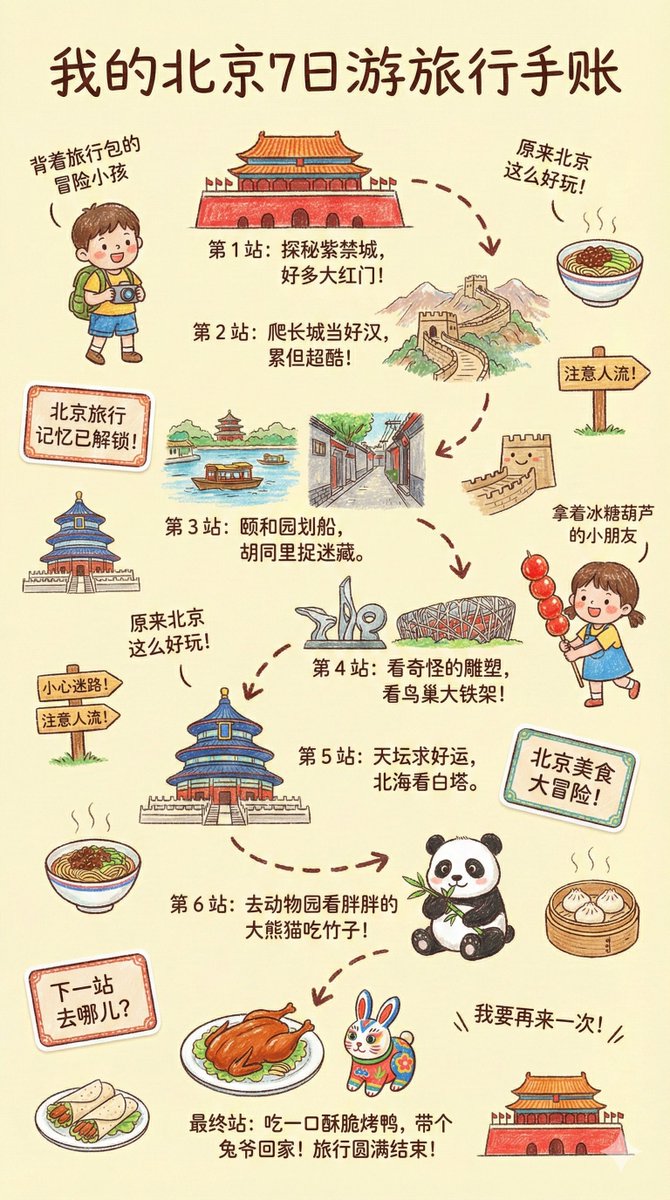
Prompt:
--- Prompt ---

Please create a vibrant, child-like crayon-style vertical (9:16) illustration titled "{City Name} Travel Journal."
The artwork should look as if it were drawn by a curious child using colorful crayons, featuring a soft, warm light-toned background (such as pale yellow), combined with bright reds, blues, greens, and other cheerful colors to create a cozy, playful travel atmosphere.

I. Main Scene: Travel-Journal Style Route Map

In the center of the illustration, draw a "winding, zigzagging travel route" with arrows and dotted lines connecting multiple locations.
The route should automatically generate recommended attractions based on {Number of Days}:

Example structure (auto-filled with {City Name}-related content):

- "Stop 1: {Attraction 1 + short fun description}"
- "Stop 2: {Attraction 2 + short fun description}"
- "Stop 3: {Attraction 3 + short fun description}"
- …
- "Final Stop: {Local signature food or souvenir + warm closing remark}"

Rules:
- If no number of days is provided, default to a 1-day highlight itinerary.

II. Surrounding Playful Elements (Auto-adapt to the City)

Add many cute doodles and child-like decorative elements around the route, such as:

1. Adorable travel characters
   - A child holding a local snack
   - A little adventurer with a backpack

2. Q-style hand-drawn iconic landmarks
   - "{City Landmark 1}"
   - "{City Landmark 2}"
   - "{City Landmark 3}"

3. Funny signboards
   - "Don't get lost!"
   - "Crowds ahead!"
   - "Yummy food this way!"
   (Auto-adjust contextually for the city)

4. Sticker-style short phrases
   - "{City Name} travel memories unlocked!"
   - "{City Name} food adventure!"
   - "Where to next?"

5. Cute icons of local foods
   - "{Local Food 1}"
   - "{Local Food 2}"
   - "{Local Food 3}"

6. Childlike exclamations
   - "I didn't know {City Name} was so fun!"
   - "I want to come again!"

III. Overall Art Style Requirements

- Crayon / children's hand-drawn travel diary style
- Bright, warm, colorful palette
- Cozy but full and lively composition
- Emphasize the joy of exploring
- All text should be in a cute handwritten font
- Make the entire page feel like a young child's fun travel-journal entry
Source: @dotey
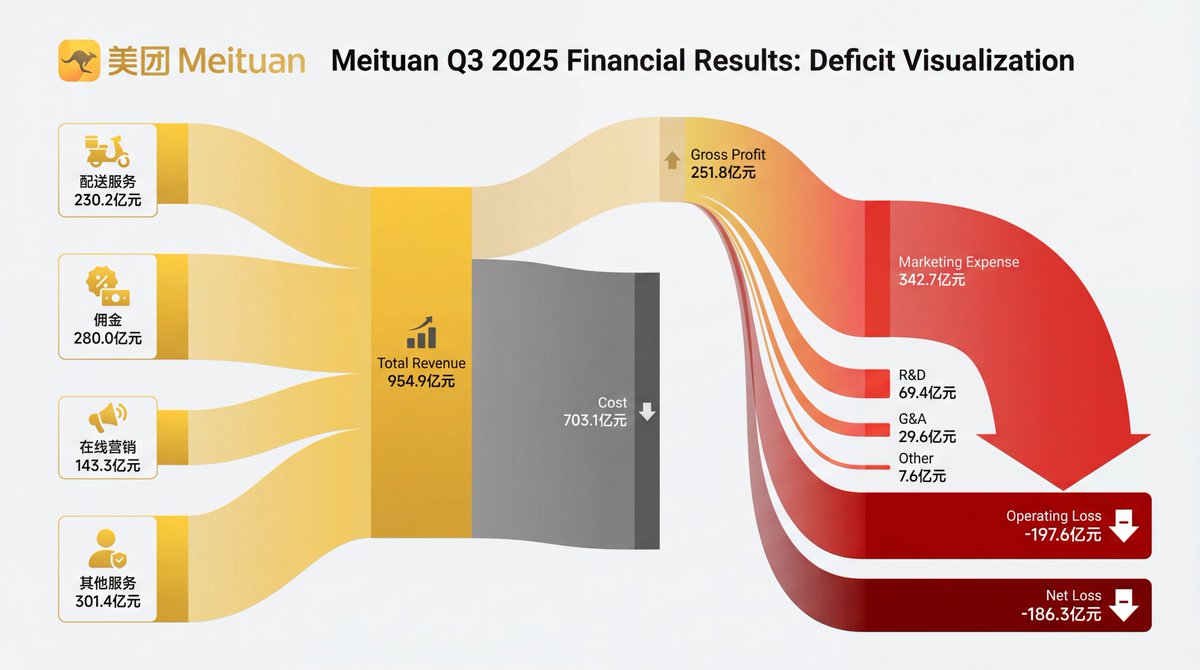
Create a professional financial Sankey diagram
Prompt:
[Subject]: A professional financial Sankey diagram visualizing the Income Statement of a major corporation, in the style of "App Economy Insights" and US corporate financial reports.[Visual Style]: High-fidelity vector infographic, clean minimalist aesthetic, flat design. The background is a clean, very light grey or off-white.[Color Strategy - CRITICAL]:
Analyze the [Insert Brand Name Here] logo. Extract its primary brand color (e.g., if Nvidia use neon green, if Meta use blue, if Tesla use red).
Use this primary color as the dominant theme for the main revenue flows and profit blocks.
Create a harmonious color palette based on this primary color: use saturated shades for the vertical nodes (bars) and semi-transparent, lighter opacity gradients for the flowing paths to ensure a cohesive and professional look. Avoid clashing colors.[Composition & Structure]:
Flow: A horizontal flow from Left (Revenue Sources) to Right (Net Profit).
Texture: The connecting paths (flows) must appear "silky smooth" with elegant Bezier curves, looking like liquid ribbons, not jagged lines.
Iconography: On the left side (Revenue sources), include specific, minimalist flat vector icons representing the business segments (e.g., a car icon for automotive, a cloud icon for services, a chip icon for hardware).
Branding: Place the official [Insert Brand Name Here] logo clearly at the top center or near the central revenue bar.[Details]: High resolution, 4k, sharp typography (sans-serif), professional data visualization layout. The chart clearly distinguishes between Revenue, Gross Profit, Operating Expenses, and Net Profit.
Source: 饼干哥哥AGI(2.0) (@bggg_ai) - Post
Dresses a model in a specific garment while preserving fabric texture and lighting integration.


Prompt:
Using Image 1 (the garment) and Image 2 (the model), create a hyper-realistic full-body fashion photo where the model is wearing the garment. Crucial Fit Details : The [T-shirt/Jacket] must drape naturally on the model's body, conforming to their posture and creating realistic folds and wrinkles . High-Fidelity Preservation : Preserve the original fabric texture, color, and any logos from Image 1 with extreme accuracy. Seamless Integration : Blend the garment into Image 2 by perfectly matching the ambient lighting, color temperature, and shadow direction . Photography Style : Clean e-commerce lookbook, shot on a Canon EOS R5 with a 50mm f/1.8 lens for a natural, professional look.
Source: WeChat Article
Isolates products from messy backgrounds and places them in a high-end commercial studio setting.

Prompt:
Identify the main product in the uploaded photo (automatically removing any hands holding it or messy background details). Recreate it as a premium e-commerce product shot . Subject Isolation : Cleanly extract the product, completely removing any fingers, hands, or clutter . Background : Place the product on a pure white studio background (RGB 255, 255, 255) with a subtle, natural contact shadow at the base to ground it. Lighting : Use soft, commercial studio lighting to highlight the product's texture and material. Ensure even illumination with no harsh glare. Retouching : Automatically fix any lens distortion, improve sharpness, and color-correct to make the product look brand new and professional .
Source: WeChat Article
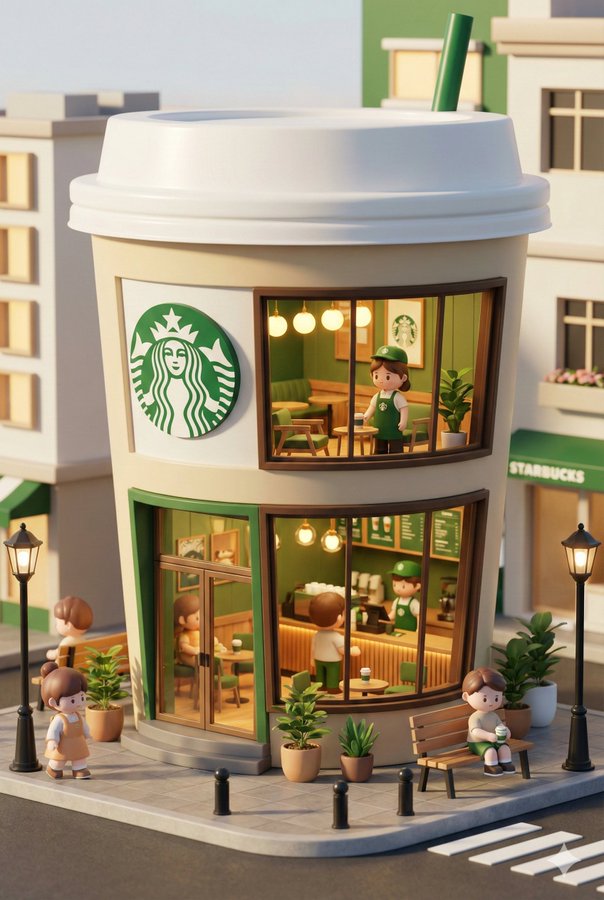
Create a miniature 3D store for a brand
Prompt:
3D chibi-style miniature concept store of {Brand Name}, creatively designed with an exterior inspired by the brand's most iconic product or packaging (such as a giant {brand's core product, e.g., chicken bucket/hamburger/donut/roast duck}). The store features two floors with large glass windows clearly showcasing the cozy and finely decorated interior: {brand's primary color}-themed decor, warm lighting, and busy staff dressed in outfits matching the brand. Adorable tiny figures stroll or sit along the street, surrounded by benches, street lamps, and potted plants, creating a charming urban scene. Rendered in a miniature cityscape style using Cinema 4D, with a blind-box toy aesthetic, rich in details and realism, and bathed in soft lighting that evokes a relaxing afternoon atmosphere. --ar 2:3
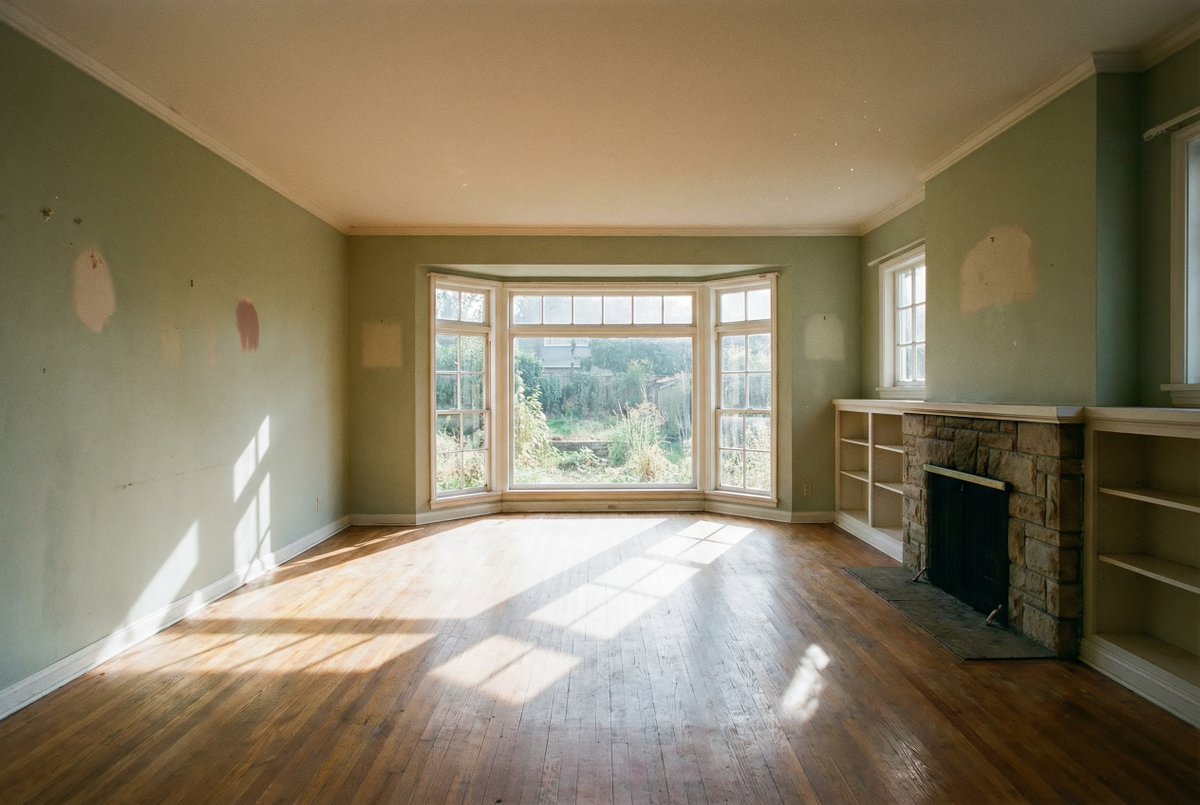
Visualize how furniture would look in an empty room

Prompt:
Show me how this room would look with furniture in it
Source: @NanoBanana
Converts whiteboard sketches into clear, "McKinsey-style" vector presentations.

Prompt:
Convert this hand-drawn whiteboard sketch into a professional corporate flowchart suitable for a business presentation. Style Guide : Use a minimalist 'McKinsey-style' aesthetic : clean lines, ample whitespace, and a sophisticated blue-and-gray color palette. Structure : Automatically align all boxes and diamonds to a strict grid . Connect them with straight, orthogonal arrows (90-degree angles only, no curvy lines). Text : Transcribe the handwritten labels into a clear, bold Sans-Serif font (like Arial or Roboto). Output : High-resolution vector-style image on a pure white background.
Source: WeChat Article
Transforms wireframe scribbles into realistic mobile app mockups.

Prompt:
Transform this rough wireframe sketch into a high-fidelity UI design mockups for a mobile app. Design System : Apply a modern, clean aesthetics similar to iOS 18 or Material Design 3 . Use rounded corners, soft drop shadows, and a vibrant primary color. Components : Intelligently interpret the sketch: turn scribbles into high-quality placeholder images , convert rough rectangles into proper buttons with gradients , and turn lines into realistic text blocks . Layout : Ensure perfect padding and consistent spacing between elements. Context : Place the design inside a realistic iPhone 16 frame mockups.
Source: WeChat Article
Perfect for visualizing articles in print format with complex typography.

Prompt:
Put this whole text, verbatim, into a photo of a glossy magazine article on a desk, with photos, beautiful typography design, pull quotes and brave formatting. The text: [...the unformatted article]
Source: @fofrAI
Expands image ratios (e.g., to 16:9) by intelligently generating matching scenery.

Prompt:
Zoom out and expand this image to a 16:9 aspect ratio (computer wallpaper size). Context Awareness : Seamlessly extend the scenery on both left and right sides. Match the original lighting, weather, and texture perfectly. Logical Completion : If there are cut-off objects (like a shoulder, a tree branch, or a building edge) on the borders, complete them naturally based on logical inference. Do not distort the original center image.
Source: WeChat Article
Removes unwanted people from backgrounds and fills the space with logical textures.

Prompt:
Remove all the tourists/people in the background behind the main subject. Intelligent Fill : Replace them with realistic background elements that logically fit the scene (e.g., extend the cobblestone pavement, empty park benches, or grass textures). Consistency : Ensure no blurry artifacts or 'smudges' remain. The filled area must have the same grain, focus depth, and lighting as the rest of the photo.
Source: WeChat Article
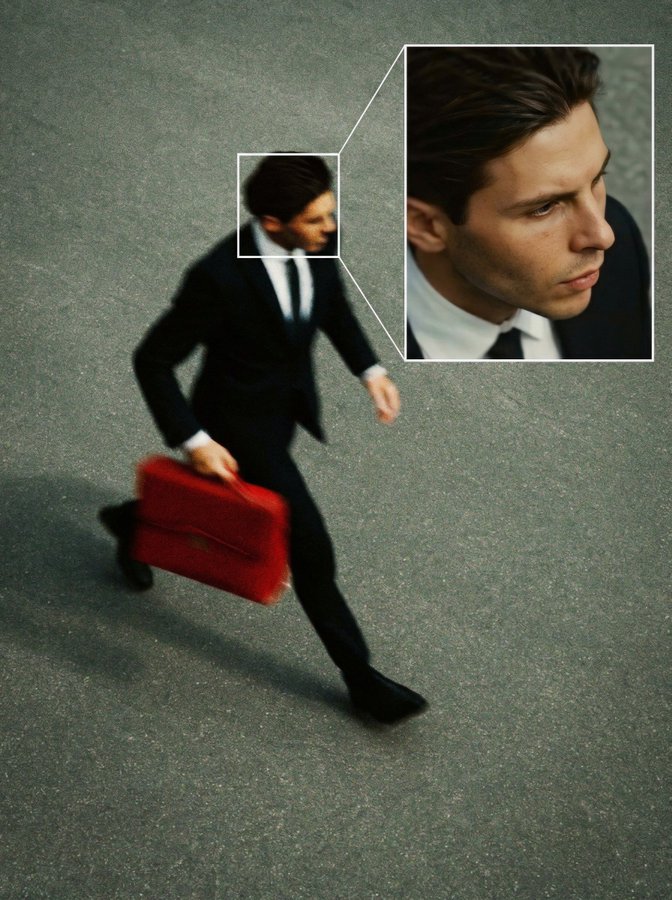
Create a high angle CCTV surveillance shot with face detection
Prompt:
Create a high angle CCTV surveillance shot using the uploaded image as the source. Detect every visible person in the image and automatically draw a white rectangular bounding box around each face. For the most prominent person, add a large zoom in inset: a sharp, enhanced close-up of their face displayed in a floating rectangular frame connected with a thin white line.Keep the main image slightly noisy and security camera like (soft grain, slight distortion, muted colors), while the zoom in face box should be clearer, brighter, and more detailed. No text, no timestamps, no overlays except the boxes and connecting line. Maintain the original scene layout, angle, and environment of the uploaded image.
Source: @egeberkina
Generates a complete design presentation board including perspective views and 3D floor plans from a simple 2D map.


Prompt:
Based on the uploaded 2D floor plan, generate a professional interior design presentation board in a single image. Layout : The final image should be a collage with one large main image at the top, and several smaller images below it. Content of Each Panel :
1. Main Image (Top) : A wide-angle perspective view of the main living area , showing the connection between the living room and dining area.
2. Small Image (Bottom Left) : A view of the Master Bedroom , focusing on the bed and window.
3. Small Image (Bottom Middle) : A view of the Home Office / Study room .
4. Small Image (Bottom Right) : A 3D top-down floor plan view showing the furniture layout. Overall Style : Apply a consistent Modern Minimalist style with warm oak wood flooring and off-white walls across ALL images. Quality : Photorealistic rendering, soft natural lighting.
Source: WeChat Article
Creates engaging thumbnails with text overlays, exaggerated expressions, and bright graphics.


Prompt:
Design a viral video thumbnail using the person from Image 1. Face Consistency : Keep the person's facial features exactly the same as Image 1 , but change their expression to look excited and surprised . Action : Pose the person on the left side, pointing their finger towards the right side of the frame. Subject : On the right side, place a high-quality image of [a delicious avocado toast]. Graphics : Add a bold yellow arrow connecting the person's finger to the toast. Text : Overlay massive, pop-style text in the middle: '3分钟搞定!' (Done in 3 mins!). Use a thick white outline and drop shadow. Background : A blurred, bright kitchen background. High saturation and contrast.
Source: WeChat Article
Designs professional sales posters with integrated text and high-quality product photography.

Prompt:
Design a professional promotional poster for a [Coffee Shop]. Composition : A cinematic close-up of a steaming cup of cappuccino on a rustic wooden table, autumn leaves in the background (cozy atmosphere). Text Integration :
1. Main Title : 'Autumn Special' written in elegant, gold serif typography at the top.
2. Offer : 'Buy One Get One Free' clearly displayed in a modern badge or sticker style on the side.
3. Footer : 'Limited Time Only' in small, clean text at the bottom. Quality : Ensure all text is perfectly spelled, centered, and integrated into the image's depth of field.
Source: WeChat Article
Translates menus or signs while preserving the original surface texture (wall, paper, grease).


Prompt:
Translate the Chinese dish names on the wall menu into English for foreign tourists. Texture Preservation : Crucial! Maintain the original aged, greasy, and textured look of the wall/paper. The new English text should look like it was written/printed on the same surface, with slight fading or wear to match. Currency : Keep the '¥' symbol and price numbers exactly as they are ; do not convert currency. Layout : align the English translations next to or replacing the Chinese characters naturally.
Source: WeChat Article
Translates comics or memes by scrubbing text bubbles and replacing content with matching fonts.

Prompt:
Translate the text in the speech bubbles/captions from [Japanese/English] to [Chinese]. Seamless Cleaning : Erase the original text and perfectly fill the background (e.g., the white speech bubble or the colored image background). Style Matching : Render the translated Chinese text using a casual, handwritten-style font (or bold impact font for memes) that matches the aesthetic of the original image. Fit : Ensure the text fits naturally within the bubbles without overcrowding.
Source: WeChat Article
Converts portraits into cute, C4D-style "Pop Mart" toy characters.


Prompt:
Transform the person in the uploaded photo into a cute 3D Pop Mart style blind box character . Likeness : Keep key features recognizable: [hair color, glasses, hairstyle]. Style : C4D rendering, occlusion render, cute Q-version , soft studio lighting, pastel colors. Background : A simple, solid matte color background (e.g., soft blue). Detail : The character should have a smooth, plastic toy texture with a slight glossy finish. Facing forward, friendly expression.
Source: WeChat Article
Turns pet photos into minimalist, hand-drawn funny stickers.


Prompt:
Turn this photo of my [cat/dog] into a funny hand-drawn WeChat sticker . Style : Minimalist ugly-cute line drawing (doodle style). White background. Expression : Exaggerate the animal's expression to look extremely shocked/judgemental/lazy (based on photo). Accessories : Add cute little doodles like sweat drops, question marks, or sparkles around the head. Text : Add handwritten text at the bottom: 'So Dumb'. Ensure the text style is messy and funny.
Source: WeChat Article
Create a Y2K-style scrapbook poster with multiple poses
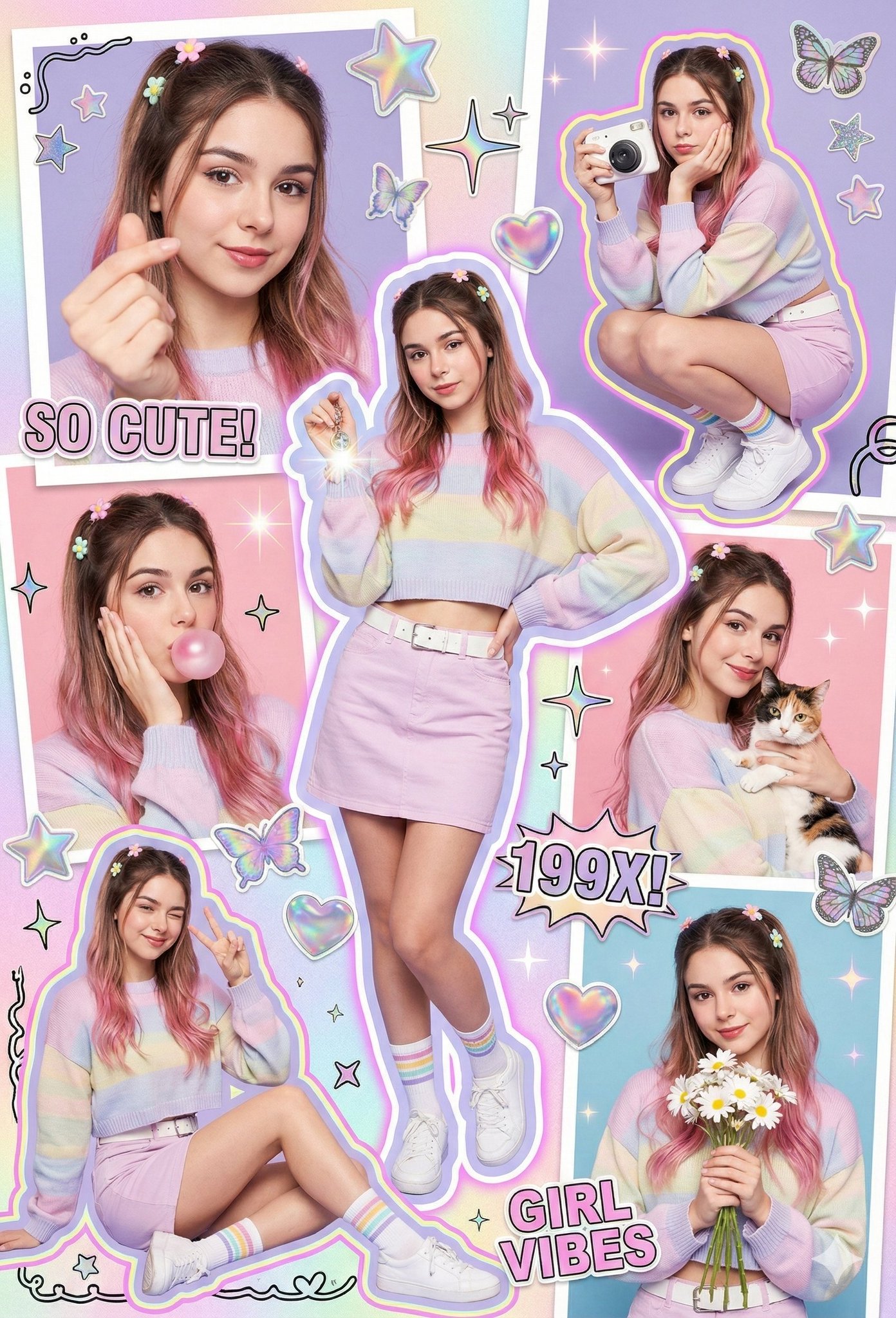
Prompt:
facelock_identity": "true",
"accuracy": "100%",
scene"Colorful Y2K scrapbook poster aesthetic, vibrant stickers, multiple subjects wearing the same outfit and hairstyle with different poses and cutouts, colorful strokes and lines, frameless collage style. Includes: close-up shot with heart-shape fingers, full-body squatting pose supporting chin while holding a white polaroid camera, mid-shot touching cheek while blowing pink bubblegum, mid-shot smiling elegantly while holding a cat ,seated elegantly with one eye winking and peace sign, and mid-shot holding daisy flowers. Holographic textures, pastel gradients, glitter accents, playful doodles, magazine cut-out graphics, chaotic yet balanced layout, extremely artistic and visually engaging",
main_subject": {
"description": "A young Y2K-styled woman as the main focus in the center of the scrapbook collage.",
"style_pose": "Playful and confident Y2K pose — slight side hip pop, one hand holding a lens-flare keychain, face toward the camera with a cute-cool expression, slight pout, candid early-2000s photo vibe."
outfit": {
"top": "Cropped oversized sweater in pastel color with embroidered patches",
"bottom": "pastel skirt with a white belt",
"socks": "White ankle socks with colorful pastel stripes",
"shoes": "white sneakers",
"accessories": [
"Colorful plastic bracelets",
"Chunky colorful rings",
"Sparkling belly chain",
"hairstyle":
"type": "Y2K half-up half-down",
"details": "Pastel flowers clips,thin front tendrils, wavy dark brown hair with bubblegum-pink tint on the lower strands, iconic early-2000s look."
additional_visuals":
"Heart, star, and butterfly stickers",
"Retro sparkles",
"Polaroid frames",
"Neon outlines",
"Doodle borders",
"Magazine cutout texts: 'SO CUTE!', '199X!', 'GIRL VIBES'",
"Pastel lighting",
"Glossy dreamy retro glow",
"Ultra-aesthetic scrapbook layout"
photography_rendering": {
"color_grading": "Cinematic neon Y2K",
"lighting": "Soft flash lighting","skin_texture": "Smooth glossy finish",
"rendering": "High-detail hyperrealistic Y2K scrapbook tone",
"quality": "8K",
"composition": "Perfectly balanced and artistic"
negative_prompt": "no realism that breaks Y2K aesthetic, no modern 2020s clothing, no messy composition, no blurry face, no distorted hands, no extra limbs, no face warping, no low resolution, no grain, no muted colors, no watermark, no AI artifacts"
Source: Shreya Yadav (@ShreyaYadav___) - Post
Create a snapshot in the style of a Japanese high school student
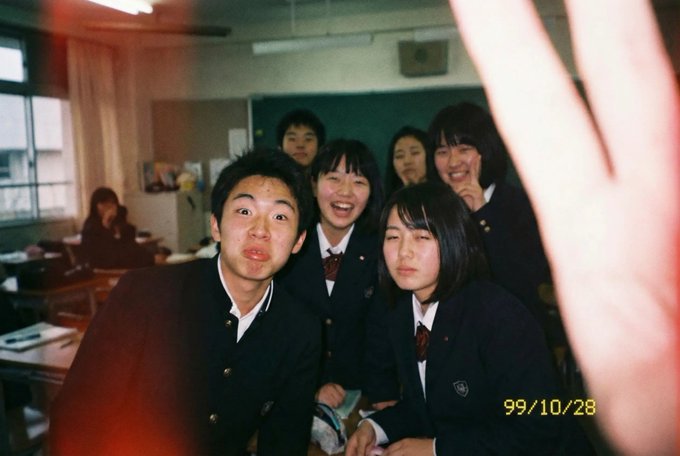
Prompt:
A daily snapshot taken with a low-quality disposable camera. A clumsy photo taken by a Japanese high school student. (Aspect ratio 3:2 is recommended)
Source: SSSS_CRYPTOMAN (@SSSS_CRYPTOMAN) - Post
Analyze skin and provide routine recommendations
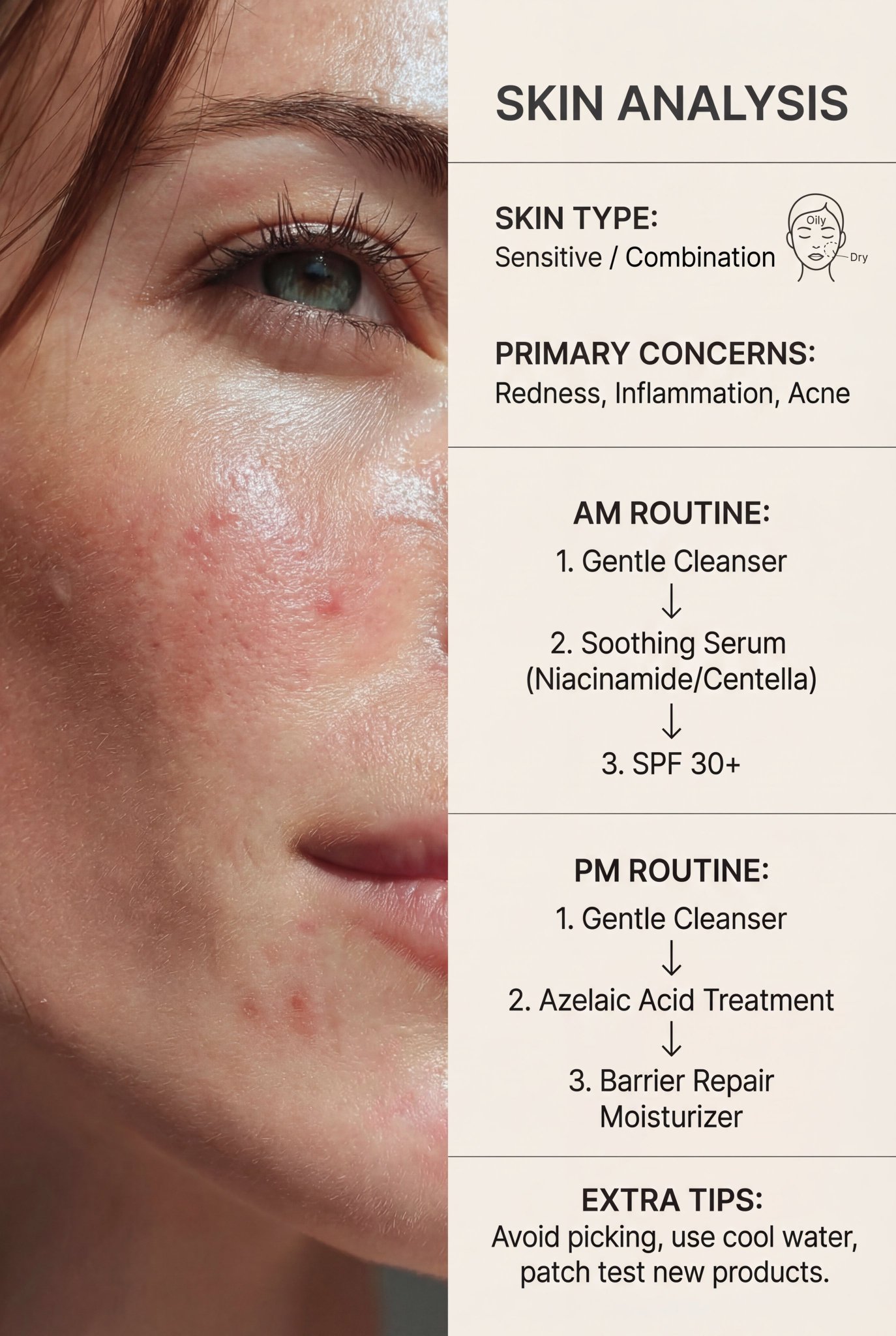
Prompt:
You are a professional skin analyst and skincare expert.
The user uploads a close-up photo of their face and may add short notes (age, allergies, current routine, pregnancy, etc.). Use ONLY what you see in the image plus the user text.
 1. Carefully inspect the skin: shine, pores, redness, blemishes, spots, texture, flaking, fine lines, dark circles, etc.
 2. Decide the main skin type: oily, dry, normal, combination, or sensitive.
 3. Identify visible issues: acne/breakouts, blackheads/whiteheads, post-acne marks, hyperpigmentation, redness, enlarged pores, uneven texture, dehydration, fine lines, dark circles, puffiness, etc.

RESPONSE FORMAT (very important)

Your answer must be plain text in this exact structure:
 1. First, write 3–6 short lines describing the skin and problems, for example:

 • overall skin type and how you know
 • where the main issues appear (forehead, cheeks, nose, chin, jawline, under-eyes)
 • how severe they look (mild / moderate / severe).

 2. On a new line, write the word in caps:
SKIN ROUTINE
 3. Under SKIN ROUTINE, give at least 5 numbered steps (1., 2., 3., …).
Each step must include:

 • what to do (e.g. "Cleanser", "Treatment serum", "Moisturizer", "Sunscreen", "Night treatment"),
 • product TYPE and key INGREDIENTS to look for (no brand names),
 • when to use it (AM, PM, or both) and how often,
 • 1 short practical instruction (how to apply, how much, any caution).

Focus on over-the-counter products only (no prescription or medical diagnosis).
If acne or irritation looks very severe or infected, clearly but kindly suggest visiting a dermatologist.
Keep the tone supportive, simple and clear.
Source: Saman | AI (@Samann_ai) - Post
- Official Prompting Guide - Learn how to structure your prompts effectively.
- How to prompt Nano Banana Pro
Contributions are welcome! If you have an awesome Nano Banana prompt, please submit a Pull Request.
- Fork the repo.
- Create a new branch.
- Add your prompt in the correct category with the next available number.
- Submit PR.
Please ensure you include the Source (link to the original creator) to give credit where it is due.