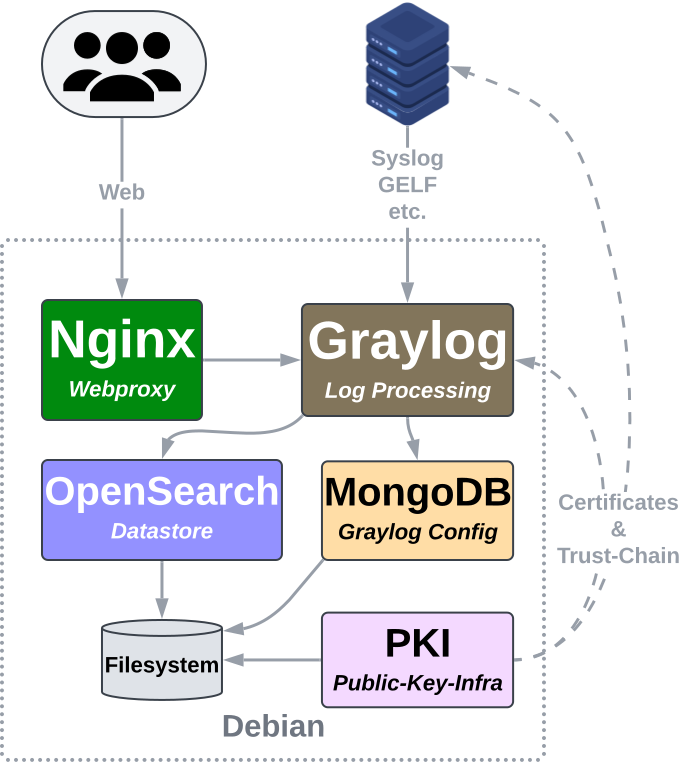
This guide covers a single-node setup of Graylog Open by utilizing docker compose.
You can also install the Graylog stack without using docker. The most important config files are the same.
For usage with Ansible - use this role.
Video: Deutsch
This guide works on a clean Debian netinstall installation.
Minimal resources I would use:
- 8GB RAM (2GB Graylog, 4GB OpenSearch)
- 4 CPU Cores
- 20GB of Disk-Space
Make sure to use a dedicated partition (LVM) or a dedicated virtual-disk if ran as VM mounted at /usr/share/opensearch to save the log-data to.
If you want/need to create index-snapshots - you might also want to use a dedicated one mounted at /usr/share/opensearch/backup.
sudo -i
apt-get update
apt-get install ca-certificates curl
install -m 0755 -d /etc/apt/keyrings
curl -fsSL https://download.docker.com/linux/debian/gpg -o /etc/apt/keyrings/docker.asc
chmod a+r /etc/apt/keyrings/docker.asc

echo \
  "deb [arch=$(dpkg --print-architecture) signed-by=/etc/apt/keyrings/docker.asc] https://download.docker.com/linux/debian \
  $(. /etc/os-release && echo "$VERSION_CODENAME") stable" | \
  tee /etc/apt/sources.list.d/docker.list > /dev/null
apt-get update

apt-get install docker-ce docker-ce-cli containerd.io docker-compose-pluginmkdir /etc/graylog
Place files into /etc/graylog:
- docker-compose.yml => update the
OPENSEARCH_INITIAL_ADMIN_PASSWORD - Dockerfile_mongodb
- Dockerfile_opensearch
- Dockerfile_nginx
- nginx.conf
- Dockerfile_pki
This is necessary for persistent data storage to work correctly.
groupadd graylog --gid 1100
useradd --shell /usr/sbin/nologin --uid 1100 --gid 1100 graylog
groupadd mongodb --gid 1101
useradd --shell /usr/sbin/nologin --uid 1101 --gid 1101 mongodb
groupadd opensearch --gid 1102
useradd --shell /usr/sbin/nologin --uid 1102 --gid 1102 opensearchmkdir -p /usr/share/graylog/data /usr/share/graylog/data/config /usr/share/graylog/data/ssl
chown -R graylog:graylog /usr/share/graylog
mkdir -p /usr/share/opensearch/config /usr/share/opensearch/data
chown -R opensearch:opensearch /usr/share/opensearch
mkdir -p /usr/share/mongodb
chown -R mongodb:mongodb /usr/share/mongodb
mkdir -p /usr/share/log-pki
chmod 700 /usr/share/log-pki
chmod 750 /usr/share/graylog /usr/share/opensearch /usr/share/mongodbOpenSearch:
ln -s /usr/share/opensearch/config /etc/graylog/opensearch- Place the opensearch config files into
/etc/graylog/opensearch- jvm.options => update the GB of RAM to use:
-Xmsand-Xmx - log4j2.properties
- opensearch.yml
- jvm.options => update the GB of RAM to use:
Graylog:
ln -s /usr/share/graylog/data/config /etc/graylog/server- Place graylog config file into
/etc/graylog/server- graylog.conf
- Add a long
password_secret - Generate graylog admin-hash and add it to the config as
root_password_sha2:echo 'PASSWORD' | tr -d '\n' | sha256sum | cut -d " " -f1
- Add a long
- graylog.conf
docker compose -f "/etc/graylog/docker-compose.yml" up -d
Logs: docker logs -f log-graylog
Status: docker ps -a
Set OpenSearch Cluster-Settings:
After the opensearch cluster is online - we need to configure its watermark:
curl -XPUT "http://localhost:9200/_cluster/settings" -H 'Content-Type: application/json' -d'
{
  "persistent":{
    "cluster.routing.allocation.disk.watermark.low": "95%",
    "cluster.routing.allocation.disk.watermark.high": "98%",
    "cluster.routing.allocation.disk.watermark.flood_stage": "99%"
  }
}
'Set Linux System-Settings for OpenSearch:
sysctl -w vm.swappiness=1
sysctl -w vm.max_map_count=262144
Also add those to the config file to be persistent: /etc/sysctl.conf
-
Check the status of the containers:
docker ps -a -
Read logs of the containers:
docker logs -f log-<COMPONENT> -
Check networking:
apt install net-tools
netstat -tulpnThe log-pki (Public-Key-Infrastructure) container can be used to generate certificates that are needed for encrypted log-forwarding.
Generate the certificate:
CMD="/pki/pki.sh --subject-alt-name='DNS:logserver.intern,IP:192.168.0.10' build-server-full logserver nopass"
docker run --rm -v /usr/share/log-pki:/pki/pki -it local/pki $CMD
Copy the key/cert pair to a directory graylog can read:
cp /usr/share/log-pki/ca.crt /usr/share/graylog/data/ssl/
cp /usr/share/log-pki/issued/logserver.crt /usr/share/graylog/data/ssl/
cp /usr/share/log-pki/private/logserver.nopw.key /usr/share/graylog/data/ssl/
chmod 400 /usr/share/graylog/data/ssl/*
chown graylog /usr/share/graylog/data/ssl/*
Then you can use it for your inputs.
Generate the certificate:
CMD="/pki/pki.sh build-client-full <NAME> nopass"
docker run --rm -v /usr/share/log-pki:/pki/pki -it local/pki $CMD
Then move the files to your client-system:
/usr/share/log-pki/ca.crt/usr/share/log-pki/issued/<NAME>.crt/usr/share/log-pki/private/<NAME>.nopw.key
Make sure your client validates the server-certificate by the provided ca.crt!
Remove an existing certificate:
CMD='/pki/pki.sh revoke <NAME>'
docker run --rm -v /usr/share/log-pki:/pki/pki -it local/pki $CMD
Then simply re-generate it as seen above.
If you want to perform a major upgrade - change version numbers in:
docker-compose.ymlDockerfile_mongodbDockerfile_opensearch
docker compose -f "/etc/graylog/docker-compose.yml" down
Replace VERSION by the current one: docker image ls
docker image rm "local/opensearch:<VERSION>"
docker image rm "local/mongodb:<VERSION>"
docker image rm "local/nginx:latest"
docker image prune -fdocker compose -f "/etc/graylog/docker-compose.yml" build
docker compose -f "/etc/graylog/docker-compose.yml" pull --quiet --ignore-pull-failuresdocker compose -f "/etc/graylog/docker-compose.yml" up -d
See: Log Forwarding
See: Monitoring

